Oldskooler Ramblings

the unlikely child born of the home computer wars

Another podcast appearance

Posted by Trixter on October 12, 2013

I’ve magically appeared on another podcast dedicated to vintage computing, this time episode #7 of Floppy Days talking about how I got into vintage computing, what I have, and what I do with it.  You can hear my interview around the 38-minute mark.

I keep threatening to put on my own podcast dedicated to vintage IBM PC computing, specifically covering the first 1.5 decades of the IBM PC and compatibles.  There are a few vintage computing podcasts dedicated to specific platforms, such as Antic for the Atari 8-bit series and Open Apple for the Apple II community.  There are also a few people commenting on their own collections and experiences, such as Floppy Days mentioned above as well as You Don’t Know Flack which centers around C64 and arcade nostalgia.  And one that rounds everything up is, appropriately, the Retro Computing Roundtable with news in the world of vintage computing and some light discussions.

But my podcast would differ from those somewhat significantly.  I have a couple of ideas that I’d like to explore, such as:

  • Mostly instructional (ie. no nostalgia talk) on how to get the most out of your collection/hobby.  Different main topic each episode.
  • Limiting every episode to 20 minutes or less.
  • Quick coverage of uncommon/obscure games.
  • Ending each episode with PC-generated music (with and without soundcards).
  • Not scripted.  (Planned and researched, sure, but no reading the entire episode from a script.)

Too nutty?  The vintage computing hobby has a relatively small active audience; is there room for another podcast?

Posted in Podcast, Vintage Computing | 13 Comments »

Hardware for an OpenIndiana ZFS file server

Posted by Trixter on October 6, 2013

It’s hard to be an Illumos user.  The amount of hardware that works correctly with OpenIndiana (my favorite OS right now) is not very well defined and relies on confirmations from the user community whether something works or not.  There are other ways to build a ZFS NAS, such as FreeNAS, but I’ve been using ZFS since it was in Solaris (x86) 10u3 and have followed the path of the devout:  Solaris 10 x86, to OpenSolaris, to OpenIndiana.

This blog post is not about how to build a ZFS fileserver; there are enough out there.  Rather, this post is about what hardware I chose to build mine.  I wanted to spend less than $1000, build something that had future storage upgrade potential, and had a motherboard + CPU that someone else had already verified as good for OpenIndiana.  I wanted ECC memory to further protect against what ZFS already protects against, and finally I wanted to boot off of a USB flash drive.

Here’s what I came up with.  Please forgive the NewEgg formatting, but at least the links are intact in case you want to go buy something:

Qty. Product Description
1 COOLER MASTER HAF series RC-912-KKN1 Black SECC/ ABS Plastic ATX Mid Tower Computer Case COOLER MASTER HAF series RC-912-KKN1 Black SECC/ ABS Plastic ATX Mid Tower Computer Case
Item #: N82E16811119233
Return Policy: Standard Return Policy
1 SUPERMICRO MBD-X9SCM-F-O LGA 1155 Intel C204 Micro ATX Intel Xeon E3 Server Motherboard SUPERMICRO MBD-X9SCM-F-O LGA 1155 Intel C204 Micro ATX Intel Xeon E3 Server Motherboard
Item #: N82E16813182253
Return Policy: Standard Return Policy
1 Rosewill CAPSTONE-550 550W Continuous @ 50°C, Intel Haswell Ready, 80 PLUS GOLD, ATX12V v2.31 & EPS12V v2.92, SLI/CrossFire Ready, Active PFC Power Supply Rosewill CAPSTONE-550 550W Continuous @ 50°C, Intel Haswell Ready, 80 PLUS GOLD, ATX12V v2.31 & EPS12V v2.92, SLI/CrossFire Ready, Active PFC Power Supply
Item #: N82E16817182068
Return Policy: Standard Return Policy
1 Intel Xeon E3-1230 Sandy Bridge 3.2GHz LGA 1155 80W Quad-Core Server Processor BX80623E31230 Intel Xeon E3-1230 Sandy Bridge 3.2GHz LGA 1155 80W Quad-Core Server Processor BX80623E31230
Item #: N82E16819115083
Return Policy: CPU Replacement Only Return Policy
1 Kingston 8GB 240-Pin DDR3 SDRAM DDR3 1333 ECC Unbuffered Server Memory Intel Model KVR13E9/8I Kingston 8GB 240-Pin DDR3 SDRAM DDR3 1333 ECC Unbuffered Server Memory Intel Model KVR13E9/8I
Item #: N82E16820239116
Return Policy: Memory Standard Return Policy
1 LG Black 14X BD-R 2X BD-RE 16X DVD+R 5X DVD-RAM 12X BD-ROM 4MB Cache SATA BDXL Blu-ray Burner, Bare Drive, 3D Play Back (WH14NS40) - OEM LG Black 14X BD-R 2X BD-RE 16X DVD+R 5X DVD-RAM 12X BD-ROM 4MB Cache SATA BDXL Blu-ray Burner, Bare Drive, 3D Play Back (WH14NS40) – OEM
Item #: N82E16827136250
Return Policy: Standard Return Policy
1 Kingston DataTraveler SE9 64GB USB 2.0 Flash Drive Model DTSE9H/64GB Kingston DataTraveler SE9 64GB USB 2.0 Flash Drive Model DTSE9H/64GB
Capacity: 64GB Color: Silver
Item #: 9SIA12K0X40410

This came out to roughly $730.

Normally I try to be fair and list pros and cons, but I only have good things to say about this arrangement.  Everything (hardware and software) worked correctly on the first try.  The performance is ludicrous; I can easily saturate a gigabit pipe with a 4-drive raidz.  There were no hitches installing OpenIndiana at all, even installing to the flash drive (which is connected to an internal USB header so it’s out of the way).  The drives are sideways so the power and sata cables can be routed behind the motherboard.  In fact, everything is routed behind the motherboard except for the main motherboard power cable.  The drives are on rails; while they aren’t hot-swap, it is very easy to swap them without using any tools.

Astute readers will wonder why I purchase a Sandy Bridge Xeon instead of something newer.  Ivy Bridge or Haswell would have given me more bang for my buck, but I wanted to play it safe with confirmed, tested hardware.  I was also unsure if my motherboard would support Ivy Bridge — it requires the latest BIOS to do so, but you need a Sandy Bridge to apply the latest BIOS!  Horrible catch-22.  So I played it safe with Sandy Bridge.  You also might be wondering why a blu-ray drive is there.  That is a “why not?” addition — if it’s possible to burn blu-ray media directly from the fileserver, that’s an additional win.  Even if I can’t, it was only $50 more than a DVD-ROM drive so hey, why not.

All of my previous builds have been from cast-off second-hand hardware; this is the first time I built it right the first time, and I wish I had done this years ago.  I have a good feeling this hardware will last me a good 6-8 years as-is.

Posted in Technology | Leave a Comment »

The IBM PCjr Exhibition Starter Kit

Posted by Trixter on October 3, 2013

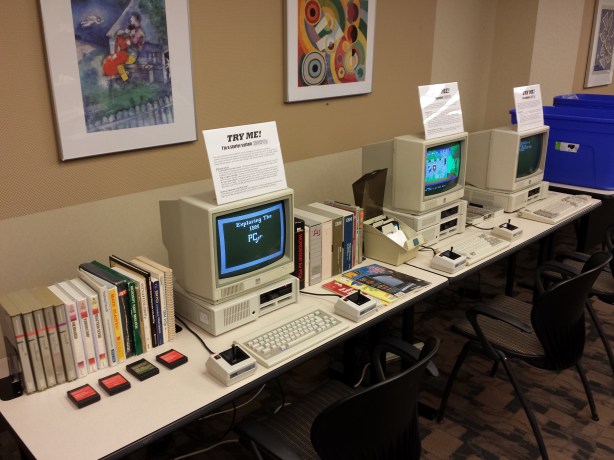
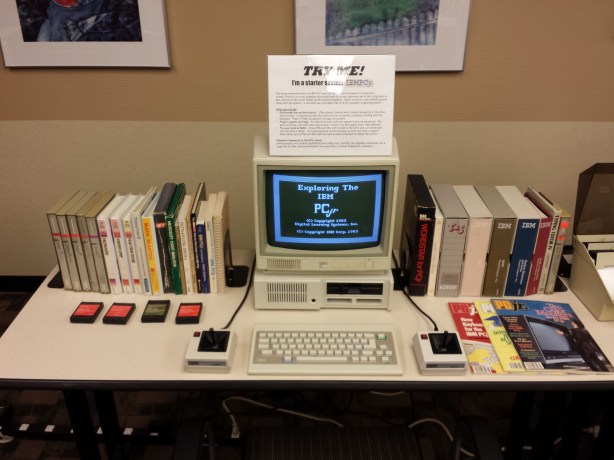
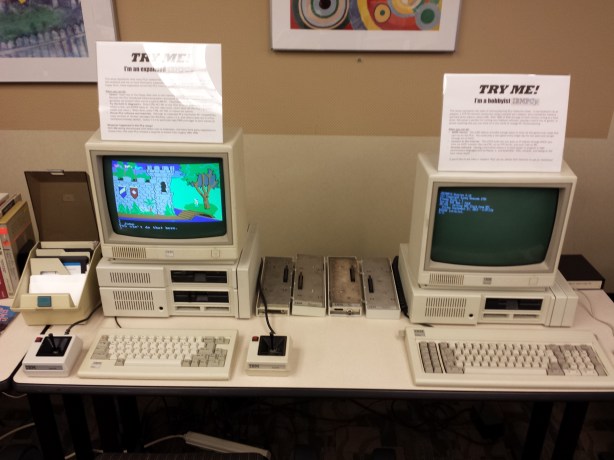
I had a blast at this year’s VCFMW.  If you peruse my event photos, you’ll notice a PCjr setup in several pictures, both with and without people using them.  This was my display, which I pimped with an hour-long presentation about the history, hacking, and homebrew state of the PCjr.  I stood up three systems:  A starter (stock) system, an expanded system, and a hobbyist/homebrew system.  All had games and books and software, with original boxes and manuals.  I also laid out some cartridge games so people could see what those were like, and also some uncommon sidecars including a speech adapter and cluster adapter.  Finally, each monitor had a sign on top of it that encouraged people to TRY ME! and listed things they could do with each system.

All in all, I was pretty happy with it — and some others were too, based on the attention it got.  Some highlights:

  • Dads and sons playing Dr. J and Larry Bird go One-on-One against each other
  • A Lode Runner expert playing for over an hour through level 32 and 192,000 points until she had to leave
  • A couple of friends completing King’s Quest (using an iphone to download maps and hints)
  • The guy who made Coverfire (Crossfire clone) playing the original Crossfire on cartridge, like he had 30 years ago

People using the systems and asking questions was exactly what I was hoping for.

Missed the show?  Want to stand up an exhibit of your own?  Not to worry!  I’ve made all of my presentation and exhibition materials available under a Creative Commons Attribution 3.0 Unported License.  You are free to use those materials if you’d like to put on a similar presentation.  The 1-hour presentation slides, unprotected disk images for some games, signs I made for each setup, and even a PCjr button and t-shirt design are there if you truly want to nerd out.

Bill of materials

Starter system: 128k PCjr, no sidecars, wireless chiclet keyboard, two joysticks

Expanded system: Racore 2nd-drive expansion, 640k, wired “pro” PCjr keyboard (the later model), two joysticks.  (Optional: NEC V20 CPU, Tandy 1000 graphcs hardware mod)

Hobbyist system: jrIDE sidecar (adds hard drive via an 8GB IDE DOM, 768K RAM, clock), parallel-port sidecar with xircom PE3 adapter connected to the internet, IBM 83-key keyboard connected via a Racore adapter

Preparation

I copied some software to diskettes (that I wouldn’t care if someone walked away with them) to demonstrate the starter and expanded setups:

  • Super Boulderdash
  • Jumpman
  • Dr. J and Larry Bird go One on One
  • Music Construction Set
  • Pinball Construction Set
  • Flight Simulator v2.12 (v2.13 has a bug if you try to use expanded memory)
  • Touchdown Football
  • King’s Quest (original PCjr booter)

These game choices were carefully considered and deliberate:

  • All of these were bootable disks that didn’t require any DOS — just insert the disk and turn on the system.
  • They all have support for PCjr graphics, sound, or both (Touchdown Football even talks!).
  • They support gameplay through joysticks which means there is no learning curve in figuring out the keyboard commands

I felt they showed off the “best intentions” of the PCjr while keeping user learning/confusion to a minimum.

Materials

To flesh out the display, I added many more materials: PCjr magazines, books, and original boxed PCjr-specific versions of software (Lotus 1-2-3, Wordstar, Typing Tutor III, Andrew Tobias Managing Your Money, others).  I wanted users to get a sense of what personal computing was like back in the 1980s and I felt the additional materials helped.  On more than one occasion people were flipping through the magazines, either looking for names they knew, or mocking some of the advertisements :-)

Here’s what it all looked like when completed:

1-20130927_184813 2-20130927_184819 3-20130927_184825

I will eventually be putting almost two hours of PCjr materials on youtube in a series of videos, but until then, enjoy the starter kit.

Posted in Uncategorized, Vintage Computing | 5 Comments »

The lazy way to work a sticky floppy drive spindle free

Posted by Trixter on September 26, 2013

In preparing for VCFMW, I was dismayed to find that one of my PCjr’s floppy drives (a Qumetrak 142) has a very sticky spindle, or a slightly stretched belt, or both.  The end result is that the diskette spins quite unevenly, like the belt is slipping.  To fix this, there are a lot of things I could do:

  • Order a new belt (someone on the PCjr forums thinks he has a lead on a source)
  • Try to rough up the inside of the belt so it has more friction
  • Partially take apart the drive and adjust two screws that will move the motor away from the spindle which will give the belt more tension

…or, take the lazy way out.  I noticed that, no matter how off the drive speed was, it usually managed to load the boot sector.  So, I created a boot floppy, loaded the boot sector into debug, and patched the boot code to this:

-l 100 1 0 1
-u 013e
1236:013E B402    MOV AH,02
1236:0140 B001    MOV AL,01
1236:0142 0E      PUSH CS
1236:0143 07      POP ES
1236:0144 BB0010  MOV BX,1000
1236:0147 FEC5    INC CH
1236:0149 80E51F  AND CH,1F
1236:014C B101    MOV CL,01
1236:014E B200    MOV DL,00
1236:0150 B600    MOV DH,00
1236:0152 CD13    INT 13
1236:0154 EBE8    JMP 013E

(I know the code can be optimized smaller, no need to tell me — this means you, Peter ;-)  This will proceed to read 1 sector from tracks 0 through 31 and then jump back to track 0 and do it again, endlessly.

I wrote this back to sector 0 and booted the disk.  At first, my drive sounded like this:  Chunk….. chunk chunk…. chunk…. … ….. chunk chunk chunk…..

An hour of it running and now I hear this:  Chunk chunk chunk chunk chunk chunk chunk chunk chunk chunk chunk chunk chunk chunk chunk chunk    Problem solved!  Well, until Saturday anyway, when I’ll likely need to run this again for an hour to work the drive.  But that will be enough for the tutorial diskette to run for the patrons.

PS: That boot sector also makes for a handy exercise to use with a floppy cleaning disk.

Posted in Vintage Computing | Leave a Comment »

Hey, a podcast appearance

Posted by Trixter on September 23, 2013

I had a great time talking with Anatoly of the DOS Nostalgia Podcast a few days ago, and what do you know, I’m capable of speaking into a microphone.  We spoke mostly about the first decade of PC gaming, and conclude with some games that were notable for being so well-programmed that they perform some amazing things on your 8088 that it really has no business doing.  Snag the episode here, and let him know what you think.

Posted in Gaming, Podcast, Uncategorized, Vintage Computing | Leave a Comment »

Vintage Computer Festival Midwest 8.0

Posted by Trixter on September 15, 2013

Only two weeks away until the VCFMW and I’m very much looking forward to it.  I will be giving a longer presentation on the PCjr than I gave at @party (which was rushed and had a lot of stuff cut out due to all @party presentations being limited to 30 minutes), and I will have two or three PCjrs set up for exhibition and public use.  These will all be functional and have software and manuals and other materials to peruse, so if you’ve ever wanted to do stuff like play the original King’s Quest on the hardware it was designed for, stop on by.

If you’ve never been, it’s a small-to-medium affair that is roughly half “Commodore convention” and half “everything else convention”.  It is smaller and much less formal than VCF East but there is a lot more hacking and swapping and trading going on.  Admission is FREE.  Tables for exhibiting or selling are FREE.   If you are anywhere near Lombard, IL at the end of the month you have no excuse to miss it.

Posted in Vintage Computing | Leave a Comment »

Access Software’s Echelon

Posted by Trixter on September 7, 2013

Someone with a lot more patience and dedication than myself reviewed a game that I always felt should have some sort of coverage: Echelon.  It’s one of those games that was more of a tech demo than a game, a phenomenon that occurred often in the first 20 years of personal computer gaming.  Echelon was essentially Access flexing their programming muscles, first with a 3-D flight sim and, in a later revision, continuous digitized sound and speech from the internal PC speaker (on any 286 or higher, otherwise it pauses the system while audio is playing).  They loved this idea so much that Mean Streets was originally going to be a spiritual sequel to Echelon, with a better flight sim.  Thankfully, Mean Streets also had an adventure game built around the flight sim that was much more enjoyable, so that’s why subsequent games are known as Tex Murphy adventures and not flight sims.

Gemini’s review of Echelon is likely the only review anyone will ever see of this game, so I recommend you check it out.  And the next time you have a rainy day you should also check out the other 120 (!) episodes of his DOS-era game review show Ancient DOS Games.

Posted in Gaming, Uncategorized, Vintage Computing | Tagged: , , | Leave a Comment »

Hump Algorithms

Posted by Trixter on August 27, 2013

I have the dumbest first-world problems. The current one: I’ve come up with new ideas for a retroprogramming/demoscene project, ideas that nobody on my platform (4.77MHz 8088) has ever attempted. They’re pretty radical, and on par with 8088 Corruption in terms of code cleverness and impact, except this time, I actually know what I’m doing (as opposed to stumbling into it somewhat by accident with Corruption). Every time I think about what is possible, I get really excited and obsess over implementation details. In my head, it’s all coded and running beautifully, bringing shocks of laughter to other retroprogrammers and demosceners alike.

The problem is, even after weeks of design, it’s still in my head.

What I have planned relies heavily on same tricks as the 8-bit democoding scene, namely lots of tables. Generation of those tables, compared to how they are used, is a highly asymmetric process: It can take hours or days to create the table, whereas using it only costs a few cycles for a memory lookup. This very similar to the process of vector quantization, where coming up with the codebook is an NP-hard problem that there is no universal solution for. To bring my ideas to life, I need to write programs that take advantage of gigs of memory and multiple cores to come up with the tables I need. So why not just write them? What’s stopping me is the dumbest of dumb problems: I simply haven’t written any large, modern, multithreaded applications before. All of my programming over the last 30 years has been either in Pascal, or assembler, using dialects and architectures that aren’t applicable to modern resources any more.

“So pick up a new language, ya moron!” is what all of you just screamed at me. I know, I know. But this is what kills me: It would take me at least a month to pick up a new language, learn its IDE, learn its visual form/component system, and the inevitable learning of how to debug my code when it all goes pants. I’ve been putting it off for at least a decade.  I can do it… but it would take at least a month to ramp up to full speed! And (said in Veruca Salt cadence) I want to code up my idea NOW!

I’m frozen. What a stupid, stupid first-world problem.

I need an algorithm for getting over the hump that can be solved in polynomial time.

Posted in Demoscene, Programming, Vintage Computing | 17 Comments »

World Firsts and Happy Accidents

Posted by Trixter on July 20, 2013

(Impatient?  Scroll down to the end of this post if you just want to watch the videos or download the programs.)

The demoscene used to be based almost completely on “world firsts”, which are bonus levels of street cred given when you are the first in the world to produce a living, working example of some new technological marvel.  In the early days it was as simple as “most sprites onscreen at once” (impressive because you were exceeding the hardware’s published limitations for that kind of thing) or “first example of texture mapping on PC” or similar.  Nowadays the “world first”, as a pure concept, as been boiled down to “first demo for a platform”.  So for modern hardware, this will likely translate into something like the very first demo for the XBone or the PS4.

But what of old hardware?  Just about every single old personal computer has had a demo made for it.  Pouet lists over 25,000 demos for over 90 platforms from the Acorn to the ZX Spectrum.  There are demos for the TI-86 calculator, for old nokia cell phones… even a goddamn typewriter.  Linus Åkesson even created his own hardware platform out of a microcontroller when nothing else seemed interesting.  It is pretty hard to find something that hasn’t had a proper demoscene demo made for it.

Luckily, my obsession with the IBM PCjr’s 30th anniversary pays off in this area.  Around the beginning of the year, I noted that there have been a few demos that supported the Tandy 1000’s 16-color graphics and 3-voice sound, but nothing that was specifically designed for the PCjr, which made it a “virgin platform”.  Since I had intimate knowledge of the CPU and had a decent development toolchain, and with @party 2013 coming up, I realized this was probably my last chance to achieve a world first, so I starting writing code around April.

To qualify as a “world first” for the platform, I felt it was appropriate to perform one or more effects that specifically required a PCjr to run, and for good measure, that nobody had ever seen before so that DOSBox or any other emulator would not be able to run the code properly.  One of my favorite features of the PCjr is a real vertical retrace interrupt that you can use to perform display operations “behind the scenes” so that any tricks you’re pulling remain invisible.  Coding to use that went very well, and no emulator or clones (save for a few early Tandy 1000 models) provided it, so I started off on a proper little demo for the platform.

Along the way, I found that my ideas to use the vertical retrace interrupt broke down because I needed to do more operations than I had time for in the blanking interval, so I wrote my own interrupt sync’d to the interval I wanted using the system timer instead.  I also discovered that the PCjr’s legendary lack of speed (it’s the slowest PC clone ever made) meant I couldn’t use the 320x200x16 mode I originally wanted to — there’s just too many bits to move around in a reasonable amount of time.  To maintain world-first status, I pondered creating a PCjr cartridge-based demo — a ton of work I wasn’t really prepared for — when I discovered that some poor coding on my part had resulted in some odd graphical properties in the 160x200x16 mode.  The wrong values had configured the PCjr’s video gate array to double each line.  Completely by accident, I had created a lower-res 160x100x16 mode with a true linear chunky organization!  (This is not the same as CGA “lowres” mode, which is based on text mode and is slow to work with.)

That mode was a great match for the slower speed of the PCjr, and I proceeded to write the entire demo and all its effects to use that mode.  I had already started a silly joke game for the PCjr, and when I discovered the 160×100 mode, I retrofitted the game to use it as well!  Both of these productions won 2nd and 1st place in their respective categories at @party 2013 (and Phoenix doing the graphics and sound for the demo was a big help; check the video below for his tiny Charlie Chaplin).

But more important than winning competitions… world first, y’all.  I’m part of an elite group of less than 100 people in the entire world.  Which I know just about nobody cares about, but I care, and that’s what makes me smile.  :-)

To view the demo, watch INTROjr on Youtube.  Regrettably, the demo is not shown at the full framerate because Youtube doesn’t support 60fps video and has no plans to in the near future (of course, they support near useless 4K resolution video, but whatever).  Download links for the software can be found on INTROjr’s Pouet page.  .

To view the game with a silly theme attached, watch HARLEM SHAKEjr  on Youtube.  Download links for the software can be found on SHAKEjr’s Pouet page.

PS: If you want source code to the PCjr-specific bits, such as the music player, the vertical retrace interrupt, setting the special graphics mode up, using multiple graphics pages, reading the joystick, etc., drop me a line.

Posted in Demoscene, Programming, Vintage Computing | 1 Comment »

Now THAT was fun

Posted by Trixter on June 17, 2013

Back from @party 2013 where I went bug-nutty over the PCjr and everyone graciously tolerated and humored me.  I gave a speedy 30-minute intro to the PCjr as the first talk of the party, then I spent 3 hours trying frantically to get my laptop and PCjr to talk to each other over ethernet so I could upload what I was working on, then coded up the rest of our demo (intro, really) with Phoenix and relaxed for a few hours until the compo.

Inverse Phase and I won the game compo with a silly little thing called HARLEM SHAKEjr and Phoenix and I came in 2nd place in the oldskool demo compo.  2nd place was quite deserved because the 1st place was Sigflup and co.’s Sega Genesis demo “Day Trip” which had some truly amazing effects in it that all ran at the full framerate.  (The end screen in that demo is 512 simultaneous colors and when you learn how it works you will laugh your ass off.)

For now, all party productions are downloadable but I don’t know how long that link will last. If you want to run my stuff, you’d better have a real PCjr because I use an undocumented video mode I discovered that doesn’t work in DOSBox.

I’ll post video of both productions in a week or so when my PCjr comes back in the mail :-)

Posted in Demoscene | Tagged: | Leave a Comment »