Disclaimer #1: Despite my fondness for triple construction (which was drilled into me in grade school English class), this post was not written with AI. In fact, it was furiously typed and edited over the course of 90 minutes on my 1998 IBM Model M13, still going strong after nearly 30 years of continuous use.
Disclaimer #2: This post was written at a time when I felt trapped and resentful that my months/years of work on a few projects would be subject to criticism “because AI”, or be judged as slop, when I didn’t feel that was warranted.
If you believe AI is universally bad across all surfaces and usages, please stop reading and go away. I am not pro-AI, but I use it, and if you refuse to believe both can be true, then I don’t want your extremist comments wasting everyone’s time.
For those who care what my personal AI disclosure policy is, here you go:
I use LLMs to summarize and explain information that I do not yet understand, or lack the educational background to understand. (Why? Because I’m not going to wait until retirement and then go back to college for 4 years to get an engineering degree in digital signal processing just because I want to compress audio I’m sending to a Sound Blaster in something cool. Not everyone who uses AI to learn is an evil person.)
I use LLMs to collate information from disparate sources, usually to discover common elements, but sometimes to find extreme outliers.
I use LLMs to analyze source code I’ve written, mostly to find bugs and comment on potential mistakes, but sometimes to suggest improvements.
I use LLMs to generate code in languages that may be required for hobby work but for which I do not want to spend months learning a new language and its libraries. Such generation is initiated with multi-paragraph starting prompts that I author from scratch, with algorithms, constraints, and targets of my own design.
I use LLMs as a replacement for phrase thesauruses and idiom dictionaries, to look up alternate phrasing while I write something.
I use neural models trained on audio to clean up recorded field audio, such as reducing reverb, or synthesizing “studio-quality” audio originally recorded in poor conditions.
I use sequence-to-sequence transformer models for speech recognition, mostly to transcribe very long spoken audio to ASCII text, which I then either read manually, or summarize using an LLM, to understand the author’s core concepts faster than listening in real time.
I do NOT use AI as a substitute for creative output: I do NOT use AI to write scripts or other forms of creative or factual writing; I do NOT use AI to write emails, messages, or other forms of written communication; I do NOT use AI to generate images, video, or music.
I do NOT use AI to generate any code that will be used in a modern context where stability or security would be a concern.
I MAY use AI in the future to generate charts, graphs, or diagrams from my original ideas or source data.
Rant^H^H^H^HOpinion
There is a fiercely divided uproar on the use of AI in 2026. (By “AI”, I’m referring to LLMs, generative AI, transformer models, vision systems, deep learning, and everything else under that umbrella.) People in favor of the technology describe it as a skillset accelerator, a junior intern, a pair-programming partner, a rubber duck, an exoskeleton, and an advanced information retrieval engine. People in fierce opposition of the technology point to its physical demands on the world, financial economical impact, industry disruption, creative bankruptcy, weaponizing fraud at scale, and the moral and ethical concerns of using what is technically a plagiarism engine.
Social media has, in the wonderful tradition of the law of unintended consequences, mostly forced people into both of these extreme camps. There doesn’t seem to be any middle ground that can be comfortably occupied by people who agree with arguments presented by both sides. In a stunning societal achievement, AI has now joined the realm of religion and politics as something people will seemingly never find any middle ground on.
I occupy the middle ground. I am neither pro-AI nor anti-AI. And while I’ve seen Scooby-Doo memes that claim all moderates or centrists are secretly right-wing extremists, the truth is far less dramatic: Moderates really do exist, and acknowledging that an issue is complex is not the same thing as picking a side. And that’s where I land on AI use, but people in both divided camps don’t like to hear that, probably because there’s no easy single-sentence resolution of a viewpoint or single-phrase directive on how to proceed.
I’ve programmed a lot. I’ve even won a few demoscene competitions with the code I’ve written. And I’m working on some new things! But now that AI has entered the global conversation, I feel extremely resentful that I am somehow expected to justify how I created something, because if I deigned to use the wrong tool or service, for the wrong reasons/application, I will be judged by the creation process instead of the end result. As someone who grew up a hacker and demoscener, where obtaining information and banging on hardware “irresponsibly” was not only a way of life but a necessary path to data sovereignty, I find this expectation of justifying my process utterly preposterous.
Adding to this frustration is the fact that what I’m working on has no precedent! It’s all novel algorithms I’ve envisioned for decades; there is no existing literature for AI to plagiarize ideas, research, or code from. If you search for what I’m working on, there are no search results. And yet, an AI disclosure policy is demanded.
You don’t deserve an AI disclosure policy
In 20 years, nobody will be asking for an AI disclosure policy. Use of AI on local hardware, decoupled from major corporations, will be as ubiquitous as using your cell phone to send text messages is today. It will be built into every device you use, even steering edge devices; your charging station will try to strike up a chat with you while your car recharges, or discover how you’ve hacked the charging network for free power and rectify the situation by extracting additional money from your bank account. 20 years from now, asking someone to disclose how they use AI would be like asking them to disclose how they check their social media feeds: Like everyone else, using abilities and infrastructure built into every device. People will look at you strangely just for asking.
People asking for AI disclosure can’t see this far ahead. People demanding AI disclosure think that the current state of AI development and use in 2026 can somehow be curbed or moderated. Both are simultaneously futile and pointless. The models have already been trained; the datacenters have already been built (back in the 90s! for the internet! that you’re using right now!). You’re not going to walk back mass copyright infringement by sticking to your values.
Why I’m providing an AI disclosure policy anyway
I’m under no obligation, now or ever, to disclose how I use AI. As previously stated, I’m borderline furious that I even have to. But I’m going to do so anyway, to satisfy both extremist camps when they come knocking. Pro-AI people want AI disclosures so that they can learn from them (How did AI help this project? What new things can I leverage that I didn’t know about?) Anti-AI people want disclosures for many more reasons: To provide (the facade of) transparency, authenticity, attribution, fairness, trust, safety, consent, and accountability. So, I’ve disclosed my AI use above.
Of course, I could be lying. It’s up to you to judge whether I’m telling the truth, based on my character and my previous body of work built up over many decades.
But before you scream “If you use AI, then you’re pro-AI!”, let me remind you that utility does not equal ideology. Adoption != endorsement. A person can drive a gas-powered car to get to work while actively lobbying against the fossil fuel industry. Or, more appropriately for my line of work: I can deploy proprietary enterprise software because my employer requires it, while personally advocating for open-source solutions.
PS: I used to love using em-dashes strategically in my writing. Thanks to AI and the societal discourse surrounding it, I am now afraid to use em-dashes in my writing, lest the accusations fly. Thanks, technology.
“How do I write a DOS program?” is a question I get several times a month. I have usually given targeted advice for each person’s situation, but my time has become quite limited so I can’t do that any more. Luckily, I stumbled across Stephan Sokolow’s Blog, which has two great entries with most of the information I usually impart:
My vote for the most subtle-yet-cruel entry in the category of brain mis-wirings is Imposter’s Syndrome. (It is also a first-world problem; apologies if this offends you.) I have it fairly bad, and it’s gotten worse as I age. It has prevented me from starting projects, finishing projects, and having normal levels of self-confidence. I am, thankfully, able to praise and mentor other people as necessary, but I cannot provide that for myself. Combine this with yearly instances of FOMO and you end up with someone who goes through waves of trying to join the party, only to feel sheepish once they get there.
This must end. Not in the manner in which my friends and fans might have hoped, but it simply has to end if I’m going to be available for the people who matter (including, most importantly, myself). So, it ends today. It ends with a list of things I’ve achieved in my life by my own skill, intelligence, and volition. I’m granting myself permission to be proud of everything on this list.
Sang on the stage at Carnegie Hall (a live performance, with a paying audience)
Participated in NAID ’95 and ’96, where I formed some friendships that helped me later in life
Created a viable “pied piper” audio compression method that can reduce already-compressed music sources up to a further 6:1 ratio with no perceptual loss in quality
And, most importantly:
Met my wife, became a better person for her, and started a family
That is truly my greatest accomplishment. It has directly touched hundreds of lives, contributed something positive to the world, and will outlive me by many decades, if not centuries.
But this person is going away, and this is the third-last post I will be writing on this blog.
Explaining what programming is in 2017 is likely best done by introducing the student to Scratch: All logic is graphical, visual, and onscreen, which matches the most common output medium they’ll develop for. But how do you explain programming like it’s 1979?
This topic came up recently in a vintage computer forum, where a long-time-listener-first-time-caller to the hobby decided they were going to do what they didn’t do in their youth: Learn to program on their early home computers (which is one of the things they were originally marketed for anyway). What struck me about this request is that the OP was truly coming from zero knowledge; they couldn’t comprehend how “ones and zeros” eventually turn into pac-man, or a drop-down menu, or a spreadsheet.
To help explain what programming itself is to the total layman, I came up with a metaphor that I thought was simple enough that I’d reproduce it here: Programming is like cooking.
How is programming like cooking? Well, how do you cook food? To cook food, you need raw ingredients, cooking utensils, and recipes. You read the recipe, which tells you which utensils to use on which ingredients and in which order. The end result is a meal. How does this relate to programming? Like this:
Cooking utensils = CPU instructions
Raw ingredients = data
Recipe = A computer program
A program is a list of steps (recipe) that use different CPU instructions (utensils) to process data (ingredients) into a new format (a meal). That’s all programming is.
Okay, but how do you make anything of any complexity, like a game or a drop-down menu? Let’s extend our cooking metaphor: Say you had to provide a ton of different, complex meals for a large catered event. To do this, you have several recipes, each producing a different result. For such a large event, it’s possible that some recipes exist only to create portions of food that themselves are used in larger recipes for a more complex meal. The process is no different than making a single meal — you’re just doing it a lot more, with more recipes, for a bigger and more complex result. How does this relate to programming? Like this:
Catered event = A complex thing the user sees on the screen
Many recipes = Many different programs
Smaller recipes that produce food to be fed into the larger recipes = Subroutines, library calls, API calls
I admit, I was eating lunch when I came up with this metaphor. But maybe it can help you explain programming to your grandparents.
I contributed a few segments to The 8-Bit Guy‘s retrospective on BASIC that covered my thoughts and memories on growing up with BASIC during the home computer revolution.
Making quality video is difficult! I had to perform several different takes before I was comfortable, and I screwed up the focus, and I needed better lighting. And I’m fat. But overall it went ok. Except for being fat.
I envy those who can do YouTube videos full time, since it seems like a lot of fun. I’ve collected over a hundred topic ideas for videos I’d like to do someday, but if I’m being realistic with myself, I won’t have the time.
When I have an exceptionally good idea, I think about it endlessly until it gets fleshed out and fully realized inside my head. This is fun. I like to work on these projects every night as a way to get to sleep. It rarely results in actual sleep, but at least I have something to think about during bouts of insomnia.
The problem with this is that it leads to obsessing over the implementation of the idea, to the point where it manifests in a really unhealthy way. When I coded some of my best demos, I would stay up until the wee hours of the morning multiple nights in a row to take advantage of the +2 INT bonus you get from hyperfocusing without distractions. This led to being inefficient at work, being short with my family, and occasionally getting sick. When I was fleshing out MobyGames with Brian Hirt, I spent every moment of my free time working on it for nearly two years, which damaged my relationship with my wife and my young children.
I’ve reconciled with my family for that period in our lives, but ever since then, I’ve been very careful about how I spend my time fleshing out my ideas. If it looks like I’ll have enough pockets of free time that don’t impact anyone that needs me, or said project doesn’t require intense focus, only then can I actually work on a project. This is a balancing act. It took several planets to align for 8088 MPH to happen, complicated by not just my own time, but the time of everyone involved. I’m amazed we pulled it off. I’m also positively thrilled we pulled it off.
I have a new idea that is just begging to get out of my head and into the real world. It’s a project that has an audience of thousands — not the largest audience, but it will make a real impact with that audience and save them thousands of hours of time, and that’s enough to make converting this idea into a concrete project. It will require me to learn a new programming language, adopt community programming practices, use collaborative platforms, and will overall be a positive learning experience.
But, it will require a large amount of discipline, focus, and study. So I’m afraid to start, because I know once I start, I won’t be able to stop. I’m afraid of causing collateral damage by being unavailable to those around me.
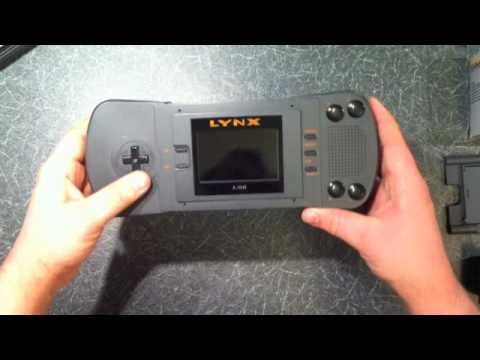
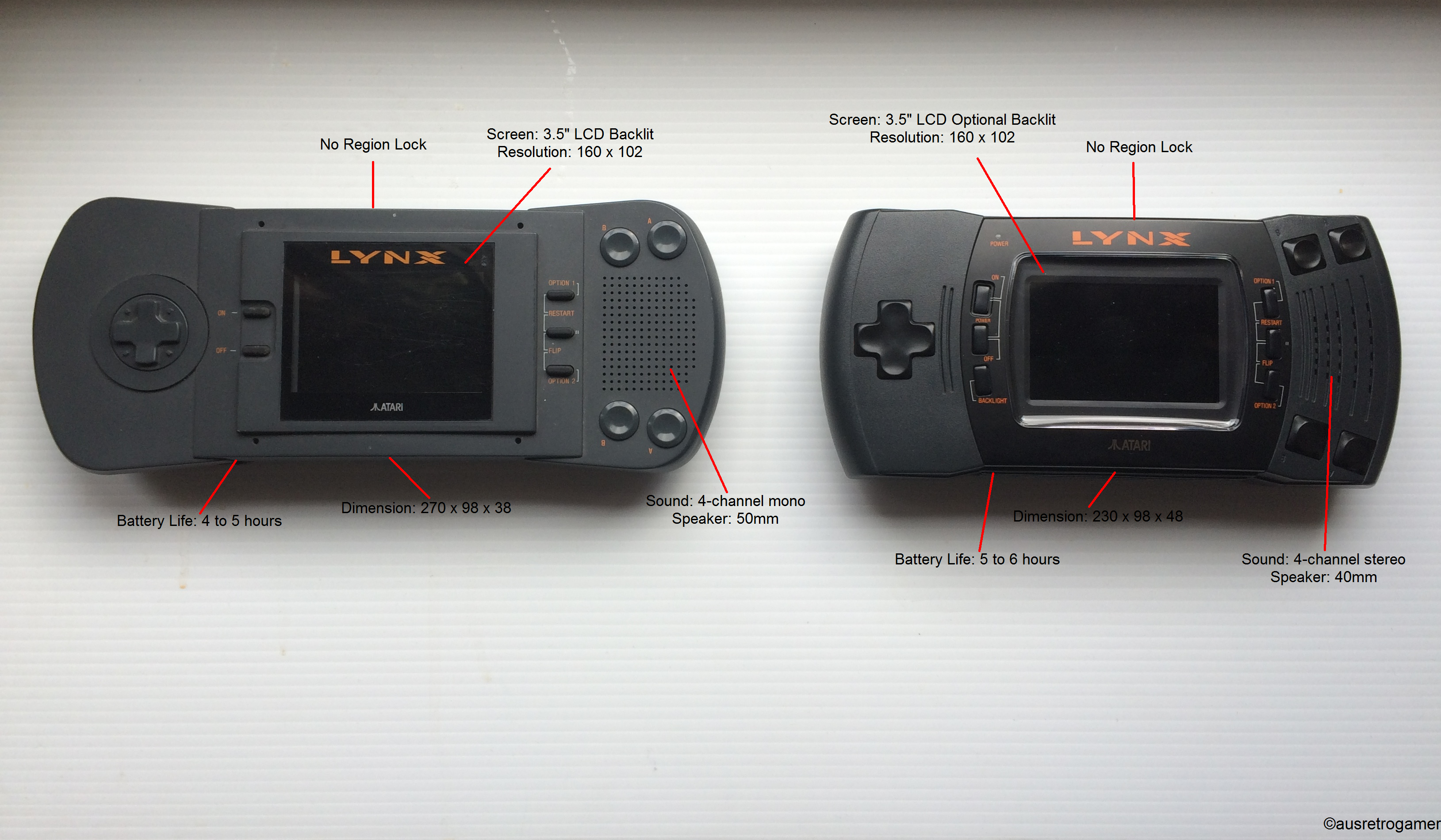
The Atari Lynx is my favorite handheld console. Planning and design started in 1986, long before the Nintendo Game Boy, but development took long enough that it was actually released half a year after the Game Boy. Whether or not that makes it the first or second handheld console is up for discussion, but it was definitely one of the first two.
History shows that the Lynx had an unsuccessful run compared to other handheld consoles of the time, which includes the Game Boy, Game Gear, and TurboExpress. Lynx’s failure in the market was split fairly evenly between three culprits:
Price: $179 vs. Game Boy’s $100
Battery life: It took 6 AAs to power the unit for only 4 hours
A lack of compelling licensed or original titles
The first hardware revision was also somewhat large, but as a guy with large hands, that never bothered me.
There were some killer arcade ports to the Lynx that really showcased what the system was capable of, such as Road Blasters, Stun Runner, and Klax. But these were ports of Atari games; Lynx never got the “big” licensees such as Mortal Kombat or Street Fighter (a double shame considering the Lynx supported true hardware multiplayer linkups).
I recently sought out the Lynx hardware specification so that I could reminisce, sadly, about all of the untapped power Lynx had that was never realized. The Lynx was so powerful that it shamed other handhelds for nearly a decade after it was discontinued:
4096-color palette
Unlimited sprites with scaling, clipping, and collision (multiple modes!) all performed in hardware
4-channel stereo sound supporting both algorithmic and sampled waveforms (in other words, it could play both pure-hardware chiptunesandAmiga mods)
Multiplayer cable connections up to 8 simultaneous players/units
Supported left-handed play via the ability to flip the screen
There were other cool bits for the time it came out too, like a limited 32-bit math-coprocessor (used for some true 3-D polygon games like Hard Drivin’ and Steel Talons). It wasn’t perfect; the system would slow down if you pushed it too hard (too many sprites, too many sampled sounds playing simultaneously), but it was creative and ambitious.
The Lynx started life as a hardware project by Epyx, initially called “Handy” (because it was to be the first handheld console). Ex-Amigans RJ Mical and Dave Needle were involved in the design, which is why Handy feels like a tiny Amiga. The initial specification was written in June of 1987 by Dave Needle. Reading through it, two things are immediately evident:
The designers of Handy had a passion for creating a fun device with as many progammer assists as possible
Dave had a wry sense of humor
I will now reproduce for you some of the comedy gold hiding in the Handy specification. I’ve truncated some sequences for brevity, but the words are all Dave’s:
The human input controls consist of a 4 switch (8 position) joy stick, two sets of 2 independent fire buttons, game pause button, 2 flablode buttons. power on, and power off….Flablode is a Jovian word meaning a device or function that we know is required or desired but for which we don’t have an actual definition (noun: flabloden, verb: to flablode).
3. Software Related Hardware Perniciousness
(or why some software people hate some hardware people)
There are certain things that the software ought not to do to the hardware. While these things are not physically destructive on their own, they will cause the hardware to act unpredictably strange, which may cause the user to be physically destructive. While we certainly could have protected the system from many of the following problems, I doubt that we would have found them all. In addition, the act of software doing one of these things means that there is a problem in the software anyway and the intended function would probably not happen. Additionally, this is only a toy. If this unit were a bio-medical device I would have found a safer solution.
3.1 Don’t Do These Things.
If you do any of the things that I tell you not to do, the hardware will act unpredictably and will not be expected to recover without a complete system initialization. So don’t do them.
3.1.5 Palettes and Page Breaks
This one is an actual hardware bug of mine…(much technical info removed)…Pen index numbers C,D,E, and F will be incorrectly unchanged. Sometimes I am such a jerk.
3.2 Please Don’t Do These Things.
There are also things that software people do that merely annoy the hardware people rather than annoy the end user. This includes seemingly harmless activities like sub-decoding bit values from byte descriptions (sprite types, for instance), or assuming address continuity between areas of hardware…Please don’t do them. It would be difficult to list all of the possibilities, so I will list the general considerations and ask you to be sensible about them. In addition, please feel free to submit a request for an exemption-on a specific case. If it is granted, we will change the specification so as to make the special case forever legal. The price will be small.
3.3 Do It This Way
Some of the hardware functions, as designed by us mindless brutes, require special handling. As we discover these requirements, I will list them here.
4.3 CPU Sleep
BIG NOTE: Sleep is broken in Mikey. The CPU will NOT remain asleep unless Suzy is using the bus. There is no point in putting the CPU to sleep unless you expect Suzy to take the bus. We will figure out how to save power some other way.
All hardware collision detection is done with the data in the collision buffer, not the data in the video buffer. This has obvious advantages and will be explained at seminars and in newsletters forever….In addition, the software can either do its own collision detection, or use the contents of the collision buffer for some weird collision detection algorithm. In either event, I will be mortally offended.
In addition, this means that when some of the bytes are not reloaded, the length of the SCB will be smaller by the number of bytes not used. If I have said this in a confusing manner, then I have.
Well, I finally found the bug that required a pad byte of 0 at the end of each scan line of data. But, It is actually 2 bugs. I have fixed one of them, but the other requires an extensive change. Too bad, I am out of time. Therefore: There is a bug in the hardware that requires that the last meaningful bit of the data packet at the end of a scan line does not occur in the last bit of a byte (bit 0). This means that the data packet creation process must check for this case, and if found, must pad this data packet with a byte of all Os. Don’t forget to adjust the offset to include this pad byte. Since this will only happen in 1/8 of the scan lines, it is not enough overhead to force me to try to fix the bug. Sorry.
This bit can be used to pause the sprite engine. The ‘unsafe’ condition of the internal registers is not directly affected by this bit.
I need to think about how to use it.
Receive parity error can not be disabled. If you don’t want it, don’t read it….We have just discovered that the calculation for parity includes the parity bit itself. Most of us don’t like that, but it is too late to change it.
11.7 Unusual Interrupt Condition
Well, we did screw something up after all. Both the transmit and receive interrupts are ‘level’ sensitive, rather than ‘edge’ sensitive. This means that an interrupt will be continuously generated as long as it is enabled and its UART buffer is ready. As a result, the software must disable the interrupt prior to clearing it. Sorry.
11.8 left out
I left something out. I know what it is but by the next time I revise this spec, I may have forgotten.
I have forgotten.
12.1.4 Bugs in Mathland
BIG NOTE: There are several bugs in the multiply and divide hardware. Lets hope that we do not get a chance to fix them.
1. In signed multiply, the hardware thinks that 8000 is a positive number.
2. In divide, the remainder will have 2 possible errors, depending on its actual value. No point in explaining the errors here, just don’t use it. Thank You VTI.
12.4 Qbert Root
As a compromise between the square root and qube root desires of the software people, and the schedule desires of the management, we have decided to incorporate the function of QbertRoot. The required steps are:
1. Start a 16 by 16 multiply.
2. Immediately write to ‘E’ which will try to start a divide.
3. Read the result from “D,C,B,A’.
(editor’s note: I can’t tell if QbertRoot is an actual function, or trolling.)
16. Known Variances From Anticipated Optimums
This is a list of the known bugs in the hardware.
…It will be OK to write to the twentyfour 16 bit registers of the Suzy SCB PROVIDING that you only do it via the MACRO PROVIDED TO YOU BY RJ MICAL. In addition, you must understand that the contents of this macro may change if future revisions of the hardware so require. In addition, you must understand that future hardware may make the process not work and therefore the macro will be changed to be a warning that you can’t use it anymore.
Don’t cheat.
My personal favorite, saved for last:
7.3 Stereo
The 4 audio channels can be individually enabled into either of the two output drivers. This is not now in the hardware. It may never get into the hardware. After all, I hate music. However, since I acknowledge that I am wrong about some kinds of music (in the right circumstances, with me not present) I have graciously allocated one entire byte for the possible implementation of another useless and annoying sound feature.
(For the record, that feature did go into the hardware, in the second hardware revision of the Lynx. If you have the later hardware, some audio is in true stereo.)
If all hardware/technical documentation was written this way, I’d be an embedded systems programmer by now.
I’ve scanned and OCR’d the full Handy specification for anyone wanting to learn more about the Lynx. There’s a compo-winning demo hidden in the hardware, just waiting to be found.
One of my bucket list items since I read my first party report back in 1991 was to attend a european demoparty and compete in a compo. Icompeted at NAID ’96 and placed there, which was awesome, but to compete with the best of the best, and win, has always been a dream of mine. I’m happy to announce that after six months of hard work with good friends and extremely talented people, we achieved just that. Our demo, 8088 MPH, won the Revision 2015 oldskool demo compo. (A personal victory for me was having it shown last in the compo, which is a sign of respect that the organizers think it’s the best high to end a compo in.) As of April 7th 2015, there are no IBM PC emulators in the world that can run the demo properly; they hang or crash before the demo is finished, and the colors are wrong. Same goes for anything that isn’t the target hardware (see below). To see what 8088 MPH looks like, I direct you to the video+audio capture of the demo running on real hardware: Because there are so many technological world-firsts in the demo, and because we’re bending the hardware in ways that people have never thought to do so, it’s only fair that we try to explain exactly how this was achieved. One of my roles was “organizer” for the demo, so I’ll break it down scene by scene, covering the basics of each trick. For parts that I wrote, I go into some detail, but for a deep technical dive into certain areas, I’ll keep this blog entry updated to point to reenigne’s, VileR’s, and Scali’s blog posts about their parts. It is our hope that these discussions will foster revived “old-school” interest in software development for the platform. After you read this summary post, please visit the following links by us that break down, in-depth, specific sections of the demo:
Before going into each part, let’s define what the target system was for the demo: A 1981 IBM 5150 (aka the very first “IBM PC”) with 640 KB RAM, a floppy drive, IBM CGA card, and internal speaker. That setup consists of:
4.77 MHz 8088 CPU. 5 MHz seems like a lot compared to other 8-bit micros, but it takes the CPU 4 cycles to read a single byte. So, compared to other 8-bit CPUs like the 6502 or 6809, which can read a byte in one clock cycle, the effective clock speed of the 8088 is more like (4.77 / 4) = 1.19 MHz.
Video adapter that has a 9-pin RGBI interface and an RCA NTSC composite video interface. Driven by a Motorola 6845 character generator. No facilities for changing text characters; font is fixed.
Internal speaker; no sound card like the Sound Blaster, or special sound hardware like the C64 SID. Speaker can be driven by a timer pin to produce a square wave, or can be bit-banged directly via a port or a one-shot timer.
The 640KB RAM requirement seems steep, but not only was it possible to add that to the first IBM PCs, by 1985 it was quite common. If you still want to cry foul, then please note the only effect that uses just about all of that RAM is the kefrens bars, so that the repeating pattern would take longer to repeat and be more pleasing to the eye. We could have reduced it, but then you might have noticed the pattern repeating quicker. With the kefrens bars effect, the demo uses 507 KB RAM; without it, the demo uses 349 KB. Most effects use much less, and some are tiny, like the plasma which uses only 6KB (which includes the banner graphics) and the picture of the girl which uses 18K (2K more than the size of the raw picture data itself). We intentionally traded size for speed, which was a deliberate decision to fit as many effects as we could into 8 minutes running time, the compo limit. If we had a few more minutes running time, we probably could have fit the entire demo into 256 KB or even less, but you would have waited longer between effects. I should also note here that there were two different versions of IBM CGA produced, which differ mainly in how composite colors are generated. We had equal numbers of both “old” and “new” style IBM CGA cards, so we chose to compose graphics for the “old” style. If you have the “new” style CGA card, the demo will still run, but the colors will be off slightly.
Technical Breakdown
Development tools used
Turbo C
Turbo Pascal
Turbo Assembler
Turbo Debugger
Visual C++
OpenWatcom
NASM (and YASM)
DOSBox
A few real IBM 5160s (hardware equivalent to the 5150, but easier to find in the real world)
Any data files were directly included in the .exe/.com files themselves. This kept everything together in the same binary which means the data could benefit from compression (see below). Most development cycles involved designing in wetware, coding on a modern system (or DOSBox running on a modern system), testing/debugging in DOSBox, and then transferring over to real hardware for a final test. Once an effect grew so sophisticated it couldn’t run in an emulator any more, this cycle slowed down as testing could only be done on real hardware. Various transfer methods were used to get code to real hardware: Scali used a serial cable; I used an ethernet card running a packet driver and mTCP; at the party we used an 8-bit IDE ISA adapter (Silicon Valley ADP-50) connected to a CF-to-IDE adapter to make a CF card the hard drive, then used a USB CF card reader to move stuff back and forth. The most intriguing method of all was reenigne’s method, who used a custom controller connected to the keyboard port that used the IBM BIOS factory test mode as a poor-man’s serial port. (I hope Andrew writes up some details on that!)
Loader, API, and general structure
We all had different preferred development languages and environments, so it was decided early on to create an overseeing “loader” that would execute .EXE and .COM files, and then people could develop effects in whatever environment they wanted to. This is not a new concept; the famous Second Reality demo did this for exactly the same reasons, and the same technique was used even earlier than that on numerous demos on other platforms. (Before you ask: No, the Second Reality code was not copied; in fact, it wasn’t even consulted, as we had to write extremely tight code to minimize memory usage, and also have it work on an 8088 (the Second Reality code uses 80186 opcodes). The loader API services assemble to about 450 bytes of code. The loader, as designed, would be responsible for:
Playing music in the background
Masking the load times and precalc times of various effects using “megademo”-style text
Providing synchronization services (such as providing a vertical-retrace interrupt in software, and a user-definable countdown timer)
Running effects with the loader consisted of this workflow:
Print text on the screen and animate it using an interrupt and the 6845 start address register
Execute the effect
The effect would decompress, perform precalc, etc. and then signal the loader it is ready to start
The loader cleans up the moving onscreen text, then signal the effect it can start
Effect starts, magic occurs
Designing this correctly was extremely important, as any bugs would derail the entire thing. It was designed fully before even a single line of code was written. I’ve shared the design doc online for the curious. (I wrote the loader.) The background music playback had to be as simple as possible so as to not interfere with any effects. A single PC beep, changing (or silencing) once every frame, was the only thing that was practical, so 60Hz beeping is what the background music consists of. The composition program used for generating the speaker timer values was MONOTONE. Even though the code for playback is only 18 lines of assembler, it takes up two scanlines onscreen, so you can see how anything even slightly more complicated would have sucked much more CPU out of the system and some of the full-screen 60Hz effects simply would not have been possible.
Executable compression
Another decision early on was to see if executable compression was feasible, which means the following:
Does it actually compress things small enough to be worthwhile?
Is the decompression quick enough to avoid long pauses in the demo?
Does the decompression routine affect the system while it decompresses? (ie. does it disable interrupts or something else equally horrible while it decompresses, which would trash the demo?)
I gathered most classic and modern executable compressors and ran tests against old programs that were representative of what we would be producing. The results were welcome surprises. The compression ratios were good enough that we could afford to include precalc’d data instead of calculating it on the fly, and the decompression was fast enough that the total end-to-end time loading a program from diskette was actually slightly faster than if it were to load uncompressed. In the end, pklite emerged as the winner. I’ve shared the comparison data online for comparison. (If I missed any packers that hold substantial advantages over the ones in the data, please let me know what they are. There were nearly 100 packers made for DOS, but unless they compress smaller than apack or upx, or decompress faster than pklite or lzexe — all while remaining compatible with 8088 — then I don’t want to hear about them.)
Scene-by-scene breakdown
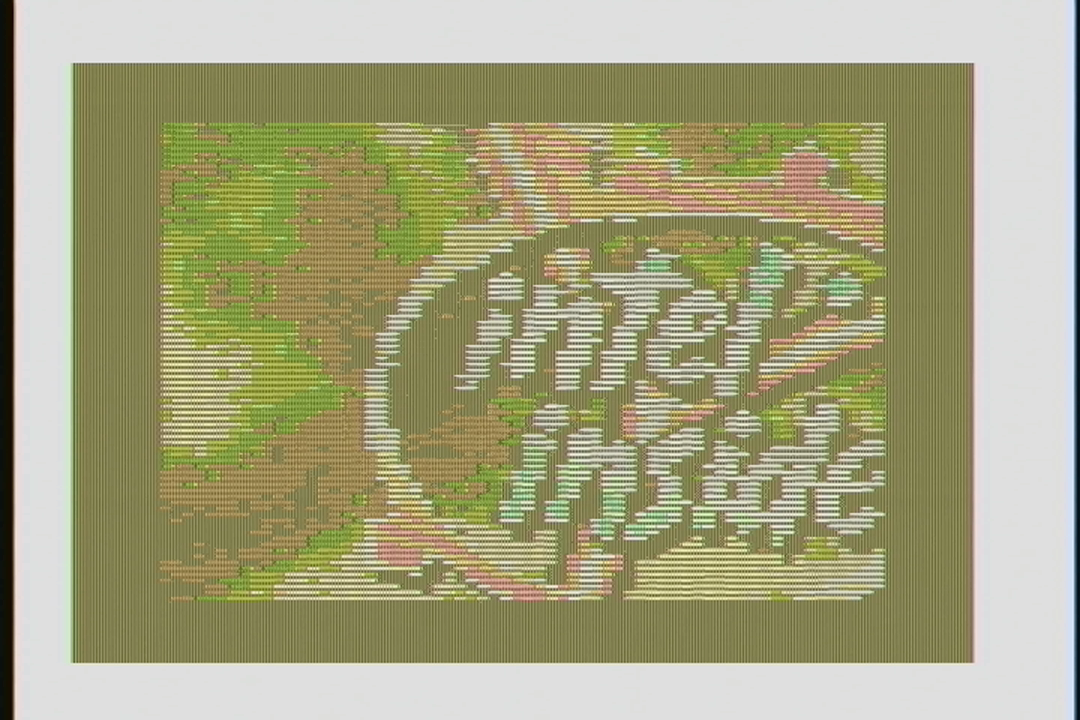
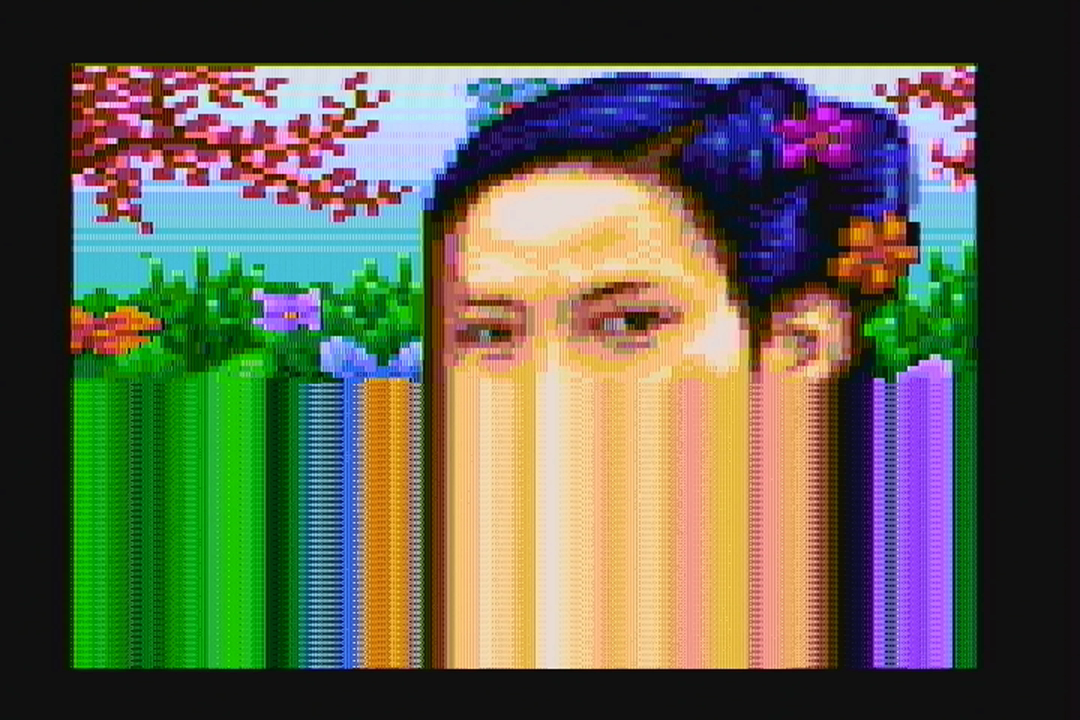
What follows is a screen-by-screen explanation of each effect. As previously stated, I’ll only describe scenes in detail if I wrote them; it will be up to the others if they want to write a technical breakdown for their parts. The explanation for each effect follows after the effect’s screenshot. The introduction was meant to serve two purposes: To educate the audience on the system and explain at just how much of a disadvantage we were trying to make a world-class demo on such hardware, and also simultaneously shatter their expectations :-) The text mode is obviously simulated; I essentially duplicated the basic BIOS functions for handling text mode but simulated in graphics mode. The cursor blinking and text blinking are handled identically to how the 6845 does it, adding to the illusion. It is (nearly) impossible to change the display start address of graphics mode such that every single scanline comes from a different place, so the title screen unrolling was done brute force, by copying new scanlines into memory hidden by retrace. The title screen goes away with a “fade” on the top edge by ANDing a mask on successive lines of the screen data. A lot of people think the title screen is the same picture demonstrated by VileR a few years ago. It’s not! He recomposed it for 16-color composite specifically for this demo, and changed it subtlety as well. The bobbing was achieved by creating a software vertical retrace interrupt that fired at the same place onscreen every time (just after the last displayed line) and then hooking it with a 6845 display start address change routine. Flags were used to communicate to the interrupt if it was time to erase the letters, which was done by simply using REP STOSW to fill screen memory with black lines. Because the 6845 displays two onscreen rows per “row”, the text could only move to even lines, which is why the movement isn’t as smooth as it could be. Well, to be fair, it could be made to move to any line we wanted, but doing so would be CPU intensive, and the whole point of the loader is to use as little CPU as possible, so this was the compromise. The simulated vertical retrace interrupt was provided through loader API services for the rest of the effects to use as well. Effects could disable it, re-initialize it, and hook/unhook their own routines to it. The moire (interference pattern) effect was achieved using a base of 40×25 text mode, the half-char block extended ASCII characters, and lots of unrolled code. The circles were chosen to represent the classic effect, but in reality the effect can combine any two images. reenigne’s effect. The rotozoomer is the same tired old routine I first rolled out in 1996 in the 8086 compo, but optimized to the hilt and sped up by only drawing every other line. A miscommunication between me and VileR resulted in probably not the best texture to demonstrate the effect, but it still runs well enough. There were plans to include a 60 Hz version of this effect, but we ran out of time. The core concept of the 1024-color mode is a serious abuse of 80×25 text mode with the NTSC colorburst turned on. VileR made the first discovery with 512 colors, and reenigne was able to double this to 1024 with CRTC trickery. Some people thought the entire demo was in this mode. It was not, because 80-column text mode suffers from the famous CGA “snow” defect when you write directly to CGA RAM in this mode. This is unfortunately visible in the plasma effect (see below). BTW, when I saw this picture in 2013, that’s when I knew I had to get all these people together to make a demo. I mean, geezus, look at it! My jaw dropped when I saw it. Had I never seen VileR’s collaboration with reenigne to make the above, 8088 MPH might never have existed. These stars were actually the result of unrolled code and a precalc’d table that, together, take a byte from one location and moves it to another position in video RAM. While we had other patterns ready, such as a swirling display, we felt the starfield was most appropriate for a typical “oldskool” demo. reenigne’s effect. The sprite part seems like black magic, but is the combination of using a sprite compiler written by Scali, and adjusting the screen vertically using the 6845 start address register. CGA only has one screen’s worth of video memory, so moving the address down scrolls the screen up, with the data repeating across the boundary. The data doesn’t repeat evenly across the boundary, however, requiring handling. The timer was monitored to know when the screen line containing the last pixel of the sprite had been drawn, which prompted redrawing the sprite. (In other words, re-drawing the sprite was an exercise in racing the beam.) Timing was very tight to avoid screen/sprite tearing effects. Also part of the compiled sprite effect, this displays 30 vectorballs at 30 Hz. We had an earlier display that used less balls to achieve 60 Hz, but Scali had the idea at the last minute to make them spell out something like “8088”, “IBM”, etc. and coded up the change at the party. The update is done using double-buffering; the sprites only take up a small rectangular area onscreen, so the screen mode’s CRTC settings were reprogrammed to provide a video mode with a small area in the middle of the physical screen, using only half of available video memory. This provided a true hidden page to draw/erase vectorballs to, which was then flipped to be visible using the 6845 display start address register. Using a 1024-color variant screen mode that could be updated using only the attribute byte (thereby limiting the number of colors to 256), this plasma had to perform writes only when the CRT beam was retracing horizontally or vertically. Unfortunately, the timing required to get this right stopped working at the party for some reason (probably happened as we were rearranging effect order), and as a result you can see a line of noise along the left side of the screen, and a little bit of noise at the top. This was my fault, as I wrote the effect using a somewhat lazy polling routine. It’s a shame CGA snow exists, because without all the retrace handling to avoid it, this effect runs at 60fps. In the demo with snow avoidance, it runs at only 20fps. VileR may write more about how this screen mode and color system is constructed, and if so, I’ll update the links at the top of this article to point to the method. If we come out with a final version of the demo, fixing this is at the top of the priority list. In fact, I’m betting reenigne could change this from a polling effect to a cycle-counting effect, which would not only fix the snow, but speed it up. The 1024-color mode reprograms the start address every two lines. I took advantage of this behavior to create a simple “drip” effect for VileR’s amazing artwork. Already you can posit that much more complicated effects are possible (thinking of the Copper demo here) but I ran out of time to make it more awesome. This classic Kefrens bars effect was done by reenigne in 320x200x4 mode. It’s a cycle-counting effect, as there is simply no time to monitor for horizontal retrace. To ensure the cycle counting was consistent, several things were done including changing the system default DRAM refresh from it’s default interval of 18 to 19, to get the DRAM refresh periods to line up with CRTC accesses. This was Scali’s effect and inspired by his 1991 demo which also featured a large torus. There are several things going on here:
Only changed portions of the screen are calculated and drawn, to minimize the amount of bandwidth needed to update the screen (this is the same “delta drawing” idea used in XDC). This was done because CGA video memory has a wait state, so the less you need to write to it, the better.
320x200x4 mode is used with a background and palette combination that gives this specific composite color palette, which included many shades of blue.
To help with the shading, dithering is applied during rasterization.
At the party, reenigne posited that it should be possible to restart the CRTC start address every single scanline. This would result in a video mode that was only 100 lines high, and would give a 80×100 resolution 1024-color mode. The above is the result of that coding, plus really extensive work done on a CGA NTSC composite signal modeling program done by reenigne months earlier to perform the image conversion. (No, you can’t have it. And before you ask, the “girl” and “CGA 1k” pictures were not stock conversions, but were hand-pixeled by VileR in Photoshop, and the 4-colors/16-colors/”Until Now” screens in a customized version of Pablodraw he created.) We didn’t have time to put text into this picture, so the people you see above are the same as in credits order: Trixter, reenigne, Scali, VileR, Phoenix, and virt. Apologies to coda and puppeh, but as you can see, any more squishing and the faces would have been unrecognizable. Sorry! Finally, the coup de grâce: A multichannel music engine for the PC speaker. We didn’t want to just copy a ZX Spectrum engine, nor other engines such as the one used in Music Construction Set, but rather set the bar impossibly high by playing a protracker mod through the speaker. Other modplayers for the speaker already exist, but they require a 10 MHz 80286, and can barely manage output at a 6KHz sampling rate. Ours faithfully reproduces all protracker effects, mixing and outputting to the speaker realtime at 16.5 KHz, all on a 4.77 MHz CPU. This was reenigne’s baby, and is a truly stunning technical achievement that required unconventional thinking and considerable 8088 knowledge to pull off. I’m sure he will write up a more detailed post on how it was done. Until then, I can mention the following details:
Preconversion of the module was necessary to align data structures and sample data to be favorable to how the 8088 indexes memory. Sample data is also converted.
Each sample must take exactly 288 cycles to calculate and output or else the sound goes completely pants. This was very difficult to achieve. 4.77 MHz / 288 = 16572 Hz sample output.
Audio output was done using traditional Pulse-Width Modulation (PWM) techniques, such as the kind made popular by Access’s Realsound. PC speaker PWM is performed by tying the PC speaker input pin to the programmable interrupt timer’s (PIT) channel 2, then programming PIT 2 for byte value one-shot mode. Any value sent to PIT 2 with the system configured like this will set the speaker HIGH and start a count, and when the count expires (ie. the sent value is reached), the speaker goes LOW again. This results in an audible carrier wave “whine”, which was why the output needed to be fast (16.5 KHz) so that the carrier wave was above the range of human hearing.
Fun fact: After preconversion of the song and being turned into a self-playing .exe, the final result is smaller after compression than the size of the original source module.
Party Sprint
At the party, we came with something that was 90% finished. Prior to arriving at the party, we created what we thought was a decent entry, and created two “failsafe” videos, one that was a capture for the bigscreen and another that showed the demo running on real hardware as verification for the judges. We were worried that the hardware we were bringing would get damaged in transit, so this was a precaution so that we could enter something if that happened. Thankfully, reenigne’s and Scali’s IBM 5160s arrived unharmed (which was especially remarkable since reenigne had to bring his from the UK to Germany on a series of trains!). We also brought two CGA cards, and two capture devices, and three different methods of exchanging new software bits from our laptops to the old hardware. You can never be too prepared! Most of the coding time at the party was spent adding the kefrens and ending portrait picture, eliminating bugs from each part where possible, adding nice transitions where possible, shaving seconds off of each part to stay within the compo limit, and rearranging parts so that virt’s BTTF-inspired tune’s intro lined up with the sprite part. We spent pretty much all our time before the compo coding, eating, or visiting the bathroom, and only had time to socialize after that. While we came mostly prepared for something that was worthy of entering the compo, the time spent at the party was invaluable for turning a rough draft into something that could really compete for first place. Having all four of us at the same table meant we could collaborate instantly. So, lesson learned: There are rarely substitutes for working together in person! One of the biggest improvements of “party collaborating” was the decision to change the credits from a variable-speed, text-only scrolling to a more evenly-paced, ANSI-style scrolling, which I think was the best implementation change compared to the bits we brought from home. To help save time (and to ensure the video was converted well — sorry, but most people don’t know how to deal with interlaced video properly), I offered to provide Gasman with a 720@60p video. The NTSC output of CGA is slightly off; instead of 262.5 lines per field, it generates 262. This means it generates 59.92 fields (29.96 frames) per second instead of the NTSC broadcast standard of 59.94 (29.97 fps). This throws off most modern capture devices; Scali had access to a high-quality Blackmagic Intensity Shuttle, for example, but it couldn’t lock onto the signal. I knew from experience that some cheap video capture devices, such as the Terratec Grabby or the Dazzle DVC100, have extra tolerance built into them as they were designed to be used with VCR sources, so I bought a few and sent one to reenigne for testing. For the capture, we used a DVC100 with some slight proc amp adjustments so that the capture looked as close to the CRT monitor output as possible. To further ensure better video capturing, we used VirtualDub for the capture software, which has an option to dynamically resample the input audio source to fit the capture framerate you are aiming for in case it’s slightly off, and the software and hardware combination worked very well. For grabbing the audio, we initially tapped the speaker with alligator clips, but Scali brought his Sound Blaster which had a real PC speaker tap you could hook up with an internal cable, so we used that for the final capture.
Looking to the future
After watching the demo and reading the above, you may be wondering if there is actually room for improvement. Believe it or not, there is: Alternative methods of sound generation and additional cycle-exact trickery are definitely possible. We had more effects to put into the demo, but ran out of time: We ran out of development time, and we also ran out of execution time, as the Revision compo limit was 8 minutes or less. I’ve known everyone who has worked on the demo collectively over 60 years. It was an honor and a privilege to work with them all to produce this demo. Will we work together again? I’d say it’s definitely possible; the day after the compo, we threw around some ideas, such as making a game next instead of a demo. Me personally, I’m burnt out and will be spending the next few weeks playing some games I’ve always wanted to finish, and working on my health. I also have some other large projects I want to get kickstarted this summer, such as something the PC software preservation movement desperately needs, and an online sound card museum. But hey, who knows.
I’ve formally released the source and binaries for the 8088 Domination encoding system under its original working title: XDC (stands for X86 Delta Compiler). Head on over to x86dc.wordpress.com to browse the github source, grab some example videos, browse the documentation, or watch a screencast where I encode a video from farm to table in under 30 minutes.
Now you too can impress your friends with your own custom videos that run on a 4.77 MHz CPU with 16K of video memory!
The response to 8088 Domination was warm, wonderful, and widespread. To everyone who dropped me a note via twitter, email, or youtube — and there were thousands of you — I want to thank you for the kind and encouraging words.
Even before I finished the design, I knew that I was going to release all of the source, so that others could make their own videos for their own vintage systems. I was careful to design the system to be easy to understand, so that it could be easy to port to other languages or extend with new features. I have a lot of comments in the code, some fairly verbose, so that there is no confusion why something is designed a particular way, or why one operation happens before another. I want this to be representative of the quality of code I usually write.
So, why am I overdue in releasing the code? Bugs! Or, more accurately, edge cases. To ensure that the encoder works properly in the real world, I’ve been testing it with vastly different sources: Animations, music videos, cartoons, even a full-length movie. And almost every time, I encounter a new edge case that needs fixing. Oh, don’t worry — The code isn’t full of special cases or bubblegum-and-shoestring workarounds. It just takes time to address each issue that crops up, and determine if it’s a true bug that needs fixing, or an issue that can be safely ignored.
“Ignore issues in code? Impossabru!” Actually, here’s an example of what I mean: I discovered a few weeks ago that I could improve the efficiency of the output a few percent by re-running some optimization phases before final compilation. However, doing this will sometimes create a small “empty” 1-byte delta that actually isn’t a delta (ie. the locations contains the same data in the previous and next video frames). It’s a bug, but is it worth fixing? I could spend days rewriting the optimization phase into a gigantic, monolithic procedure where all parts coordinate… or, I can throw these 1-byte non-changes away at the end of the existing optimization phase. You can guess which path I chose.
Some bugs are indeed bugs, and they must be fixed before I put my name on the code. For example, the bug that forced the encoding loop into a deadlock, or the bug that randomly produces black flashes in the output (still working on this one), or the bug whose generated code forgot to set a single register which prevented videos from being played without a soundcard present.
So, I hope everyone understands why the code release is late. Well… one of the reasons it is late. The other reason is that making your own videos will require some documentation (some user-directed preprocessing of the source video is necessary — sorry!), and a video showing the steps involved couldn’t hurt either, so that will require a few days by itself.
While you’re waiting, why not help me decide what movie to convert and release with the final distribution? In keeping with the spirit of the time period, I’m going to convert an entire full-length movie using the system, and ensure that it will fit onto a single CD-ROM so that users without homebrew XTIDE controllers can hook up a SCSI CDROM drive and enjoy the flick (ironically). The defacto example for this kind of thing is Star Wars, although I’m partial to TRON, as it was released after the IBM PC itself was and has its own share of iconic sequences. But, I’ve already done TRON to death, so what would you like to see? Vote in this handy poll, and if the movie you want to see isn’t there, please write your choice in the comments.









You must be logged in to post a comment.