Oldskooler Ramblings

the unlikely child born of the home computer wars

Archive for the ‘Vintage Computing’ Category

Blogging on the move at Block Party 2009

Posted by Trixter on April 15, 2009

I’m headed off to Block Party 2009; hopefully I can see some of you there, and maybe meet some new sceners.  I am going to try to enter the oldskool demo compo, but no promises.  (I am a very slow coder, because I am overly paranoid careful.)  This year, I’m part of a four-man party bus with virt, necros, and Ubik — a #traxing good time should ensue.

This year, I’m going to join the 21st century and attempt some mobile blogging.  I recently got a Blackberry Curve, and it has this newfangled internet connectivity and positional stuff, so I’m going to try to use it.  I’ll be taking pictures (automatically geotagged, of course) and posting them to my Flickr photostream, and I’ll also be updating where I am and what I’m doing on hopefully a sub-hourly basis on my Twitter account.

So, let’s recap how to follow me:

MobyGamer’s photostream

MobyGamer’s twitter feed

God help me.

Posted in Demoscene, Vintage Computing | 4 Comments »

Learning to let go

Posted by Trixter on March 16, 2009

There’s a happy ending in here, so don’t cry for me Argentina.  Also, it rambles a bit.  These conditions should come as no surprise to those who know me.

For many collectors, librarians, and historians in the field of computer preservation, there is a line between “productive” and “OCD hoarding complex”.  I wouldn’t call it a fine line — it’s pretty broad — but a couple of measured steps in one direction and you can easily travel from museumland to crazyville.  My collection, for example, takes up about seven bookshelves (software) and about 700 cubic feet of space (computers/hardware in the basement and crawlspace).  I usually have three or four projects around me at a time, and so my work area is usually always quite cluttered.  For my current state of project completion, I consider myself right on the line:  If I acquire more stuff, it will progress from “cute little stockpile” to “life-threatening”.  If I let go of some stuff, it will migrate down to the happy state of “collection”.  But as a collector, it is against the fiber of my being to let go of… well, anything.

There are several things that tug at the heartstrings of a computer historian.  The most common is the occasional report of a large collection that was junked because the owner (or widow) didn’t know what they had.  Those are frequent enough (and geographically distant enough) that it’s easy to develop a callus.  Less common are when collections are offered directly to you, but you don’t have the space/money/time/permission/health/etc. to accept them.  Even less common are reports of collections that have been lost not due to negligence, but rather some sort of unexpected disaster (ie. fire, flood, etc.).  All of these royally suck ass, for lack of a more eloquent colloquial euphemism.  But the absolute worst is when you’ve done everything right — found assets, stored them properly, tagged and cataloged them — and circumstances dictate that it is you who needs to give them up before they have been fully processed.  And that time finally arrived for me.

I decided to let go of arguably the golden nugget of my collection:  My cache of Central Point Option Boards.  The personal aftermath of this decision surprised the hell out of me, as I actually feel… better about the entire experience.  (I lack the psychological knowledge to self-analyze why that is; suggestions welcome.) Why did I let them go?  So I could attend a demoparty.

Let’s talk about demoparties.

One of the things I look forward to most in life (other than family events, of course) is attending demoparties.  Europe is maggoty with demoparties (if you look hard enough, you will find at least one every weekend), but here in North America they are few and far-between.  The most amount of major NA demoparties we have had in a single year is two, and that was last year!  (And that won’t be repeated in 2009 because NVision will not occur this year.)  And because NA is so big, it can be a significant financial investment to get to one if you don’t live nearby.  Luckily, Jason Scott — probably at significant personal detriment — has committed to putting on no less than five annual large demoparties, which he both organizes and hosts.  This year is the third one, and although it isn’t as big as some Euro parties, it definitely has the correct vibe, which is a major accomplishment for being so far away from the demoscene nexus.  It’s got a room away from the convention that hosts it all decked out for coding, watching demos, meeting with sceners, listening to demo tunes, etc.  There are compos (including a true wild compo) in front of an audience of at least 200 people.  There are many scene in-jokes floating around.  There is booze of exotic varieties, ranging from home brews to salmiakkikossu (salmari) and a lot inbetween.  About the only thing missing is a bonfire — which is admittedly very difficult, since most NA demoparties are inside convention centers, hotels, or schools.

I mention the demoscene stuff because it is one of my first loves — and the Option Board is another.  In fact, my involvement with the Option Board (is this starting to sound dirty?) goes as far back as 1987.  I became so intimate with it (yeah, this is starting to sound dirty; my apologies) that I began to develop a sense for what settings to give the software based on the publisher of the game I was trying to copy before I even looked at the disk.  Even today, I use Option Boards in my hobby work, sometimes even transferring difficult disk images to overseas colleages who are more adept at cracking than I am, so that they can be dismantled and released into the wild.

So.  I love demoparties and I love my collection of Option Boards.  I lacked the money to go to Block Party this year.  I could sell the Option Boards, to get the money, but I hadn’t properly archived them yet (meaning, put up a web page about them, describe them and their usage, trivia, etc.), which is something I usually spend months doing — because I am anal about stuff like that.  I was stuck.

So how did I resolve these two diametrically-opposed objectives?  I cheated. I decided to perform a best effort at a quick documentation and archival process, and then sell them.  For a single weekend, every spare moment of time was spent scanning manuals and other materials, copying software, taking photos, and writing up a small history of the boards and how to use them.  All of this was organized into the Option Board Archive, which is now available for your leeching pleasure.  In an age where the DMCA is used for repeated abuse, the Option Board is a historical curiousity: A product marketed specifically to break the law (if you used it inappropriately), so I am glad to have had the chance to make my contribution to the world of Option Board history.  And as for the boards themselves, they are on their way to their new owners.  Two of them are going to a computer history museum in Germany; another is going to the KEEP project in France; the other three are going to private collectors with an active interest in using them to further their vintage computing hobby.

I can’t see a downside to this:

  • I get to go to Block Party, on my own terms (I’m paying my own way — my attendance is not conditional on any obligations.  That means a lot to me.)
  • I got the damn things archived and documented
  • I get to see other vintage computing hobbyists enjoying the boards
  • My family gets to see some more clutter go out the door

Life is good.

So does this mean I’m going to start liquidating everything I have, to achieve a zen-like state of higher conciousness?  Um, hell no — at least, not before I’ve had a chance to archive it all properly.  2010 will be the year of the soundcard museum, mark my words.  Now where did I put those Interwave cards…

PS:  I saved two boards for myself.  I’m not that crazy.

Posted in Demoscene, Software Piracy, Vintage Computing | 6 Comments »

25 Years of Junior

Posted by Trixter on November 6, 2008

25 years ago, IBM announced the IBM PCjr.  23 years ago, they killed it as swiftly as one would kill an attacking weasel.  IBM had good reason to bury it:  It misinterpreted its audience, didn’t forecast for the future properly, was too expensive, and most ironically, it wasn’t as IBM PC-compatible as some clones.  But just before it died, it managed to infect the industry with a few innovations that continue to this day.

Let me hit you up with some PCjr 101.  Your time is valuable, so I’m going to ditch the long boring history lesson and get right to the juicy stuff. Here are main features that set the PCjr apart from the PC — along with the good, the bad, and the ugly:

Feature The Good The Bad The Ugly
Used “sidecars” instead of slots Very easy to expand the machine without opening it Locked you into IBM proprietary expansions You could quite literally double the width of the machine with a crapload of sidecars attached to it
No DMA capability Kept the cost down for consumers CPU was required to transfer data from floppy disk The entire machine ground to a complete halt every time the floppy disk was accessed, which made downloading from BBSes an exercise in frustration
Memory-mapped video Use as many video pages as you need; no more CGA “snow” All of main memory was now display memory, which needed slow wait states to be compatible with the video hardware Because of the wait states, the PCjr was the only PC ever created that was slower than the original IBM PC
Initially limited to 128KB Kept the cost down for consumers Because of memory-mapped video, any decent PCjr graphics mode with two video pages meant there was no memory left for programs 128KB machine was only fully usable via BASIC, since BASIC was in ROM and didn’t take up system RAM. Memory expansion sidecars were required to approach rudimentary compatibility with most PC programs.
16-color graphics All 16 text colors could be used up to 320×200, and 4 colors in 640×200 More colors = more memory to sling around = slower screen updates More colors = less main memory for apps, so most third-party games required an additional 128KB to use PCjr modes
3-voice sound 3 individual tones plus noise channel Noise channel inflexible unless you were willing to give up one of the frequency channels; clock divider meant frequencies couldn’t go lower than 110Hz Thanks to the idiotic clock divider locking you out of lower octaves, most audio on the PCjr was one octave higher than usual making everything sound like a kid’s music box
PCjr-specific monitor Was cheaper than other RGB monitors and had a speaker built-in; matched dimensions and style of system unit Image quality was substantially fuzzier than most RGB monitors; had proprietary connector that could only be used by the PCjr PC Speaker sound could not be routed to the external monitor speaker, which means the monitor’s speaker was useless unless 3-voice sound was playing
Keyboard used rubber keys Spaces between the keys meant that custom application overlays could cover the entire keyboard Keys had zero tactile feedback (although you could enable an audio keyclick) Touch-typing on the rubber “chiclet” keyboard was impossible unless you were willing to live with nerve damage.  A few months after the PCjr launch, IBM provided a free replacement keyboard with more typical keys.
Keyboard was wireless Could sit on the living room couch and use PCjr Infra-red technology limited use to line-of-sight at six feet or less A lot of people ended up buying the keyboard cord
Cartridge slots Cartridges boot instantly; larger programs like Lotus 1-2-3 could be put into cart ROM, making them usable with only 128KB RAM Carts were limited to 64K; hardly any software came out in cartridge form The space the cartridge slots took up could have been used better as space for a second disk drive, something IBM never offered for the PCjr.  Quirk: PCjr forcibly rebooted when a cartridge was inserted or removed.

The Bad outweighed The Good just enough for consumers to buy other machines, so IBM discontinued the PCjr 18 months after it had launched it. Even the release of several third-party addons that tried to bolt on necessary functionality (memory beyond 128KB, 2nd disk drives, hard drive, faster processor, etc.) could not save it.  Poor PCjr never had a chance to make an impression…

…or did it?  Tandy, in the creation of their Tandy 1000, had chosen the PCjr as the machine to clone+enhance.  When the Tandy 1000 was released in 1985, it had all of the good stuff of the PC (DMA, ISA slots, hard drive capability, memory up to 640K) as well as the PCjr (16-color graphics, 3-voice sound).  Even better: Sierra, through their prior agreement with IBM, already had games both published and in development with full support for PCjr Tandy graphics and sound.  The Tandy was cheap, you could buy it at any Radio Shack, and — most importantly — get face-to-face support for it at any Radio Shack, which appealed to first-time home computer buyers.  It was a runaway success, and little PCjr’s graphics and sound legacy got dragged along for the ride, forever changing how the PC was perceived as a gaming platform.

There is a small corner of my heart reserved for the PCjr (and the Tandy 1000 as well), but by far the sweetest love letter you will find for the PCjr is Mike Brutman’s PCjr Page.  Head on over.

Posted in Vintage Computing | 28 Comments »

The diskette that blew Trixter’s mind

Posted by Trixter on September 28, 2008

As an IBM PC historian, one aspect of my hobby is archiving gaming software.  (You can take that statement to mean anything you want — whatever you think of, you’re probably right.)  At the 2008 ECCC this past Saturday, a vendor wanted to offload his entire PC stock on me for $5, which I happily accepted since there was at least one title in there (Martian Memorandum) worth that much.  When I got home, however, I found two additional Avantage (Accolade’s budget publishing title) titles that have not yet been released “into the wild”.  This means there are no copies of these games floating around on Abandonware sites.  For me, this was like finding actual gold nuggets in a collection of Pyrite.

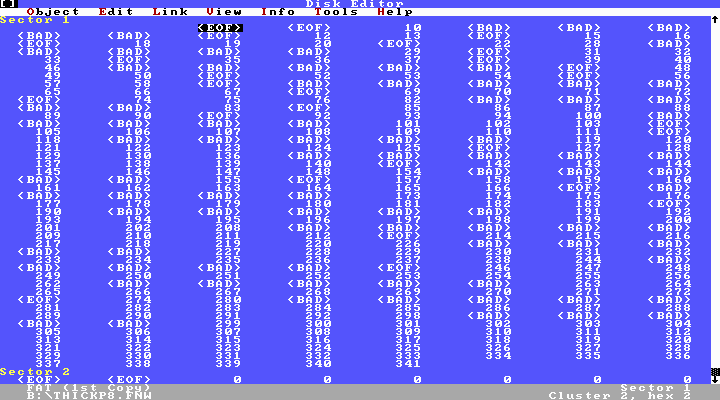
The two games I got were Mental Blocks and Harrier7, so they join my third Avantage title Frightmare.  I decided to archive all three properly, and it was when I got to Mental Blocks that I ran into something I’d never seen before: The manual for Mental Blocks claims that, for both C64 and IBM, you put the diskette in label-side up.  I thought that had to be a typo, since every single mixed C64/IBM or Apple/IBM diskette I have ever seen is a “flippy” disk where one side is IBM and the other side is C64 or Apple — until I looked at the FAT12 for the disk and saw that tons of sectors in an interleaved pattern were marked as BAD — very strange usage.

The Incredibly Strange FAT of Mental Blocks That Stopped Living And Became Mixed-Up Formats

The Incredibly Strange FAT of Mental Blocks That Stopped Living And Became Mixed-Up Formats

A DIR on the disk shows that only about 256K of it is usable as space, instead of 360K.  My Central Point Option Board’s Track Editor (TE.EXE) confirmed that every other track on side 0 cannot be identified as MFM data.  So the manual is correct, and this truly is a mixed-format, mixed-architecture, mixed-sided diskette.

This diskette has officially blown my mind.

This is the very first time I have ever seen something like this.  The data for the IBM program takes up more than 160KB as evidenced by a DIR.  The C64 1541 drive is a single-sided drive; IBM’s is double-sided. Based on all this, we can deduce how this diskette is structured and why:

– The IBM version of the game required more than 160KB (ie. needed more than one side of a disk), probably because it has a set of files for CGA/Herc (4/2 colors) and another for EGA/Tandy (16 colors) and either set will fit in 160K but both won’t
– The C64 version required around 80K, based on the fact that every other track is unreadable by an IBM drive
– The publisher had the requirement of using only a single disk to save on packaging and media costs
– Not wanting to limit the game to either CGA or EGA, someone at Artech (the developer) built the format of this diskette BY HAND so that DOS would not step on the C64 tracks, and somehow the C64 would also read/boot the disk

I don’t know how the C64 portion boots since track 0 sector 0 looks like a DOS boot sector, but quick research shows that C64 disks keep their index on track 18.  If anyone knows how C64 disks are read and boot, I’d love to know.

I think I need to go on a mission to discover who built the disk format(s) by hand to see what he was thinking.  Did he work on it for weeks, feverishly trying to figure out how to meet the publisher’s demands?  Or was he so brilliant that he did it all in a day or so, not thinking too much about it other than it was just another facet of his job?  Fascinating stuff!

Just goes to show that you can still get surprises in this hobby after 25 years, even after being considered one of the top 20 “subject experts” for PC oldwarez.  I guess you truly can never see it all.

Posted in Software Piracy, Vintage Computing | 180 Comments »

Kicking my own ass

Posted by Trixter on August 8, 2008

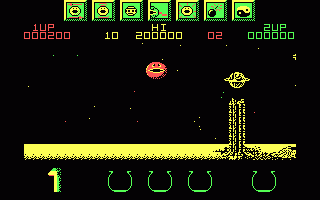
I love Wizball. Every few years, as I slowly work my way through my hobby of restoring vintage IBM PCs and clones, I will pull Wizball out and try to finish a game on the PC that I’m restoring at that time (as a burn-in test — yeah, that’s it), and see how far I can get.

The PC version of Wizball is brutal in that the speed of the game is not constant. It speeds up and slows down based on where you are and what enemies are onscreen, which is annoying all by itself, but the real problem is that the entire game is not based off of a timer. If you play it on an original 4.77MHz 8088, gameplay is glacial; the game itself is much easier because of the slower speed, but you discover a new hidden gameplay mechanic of endurance (it can take three to four hours to finish). If you play it on any 80286 or higher, it’s too fast to play.

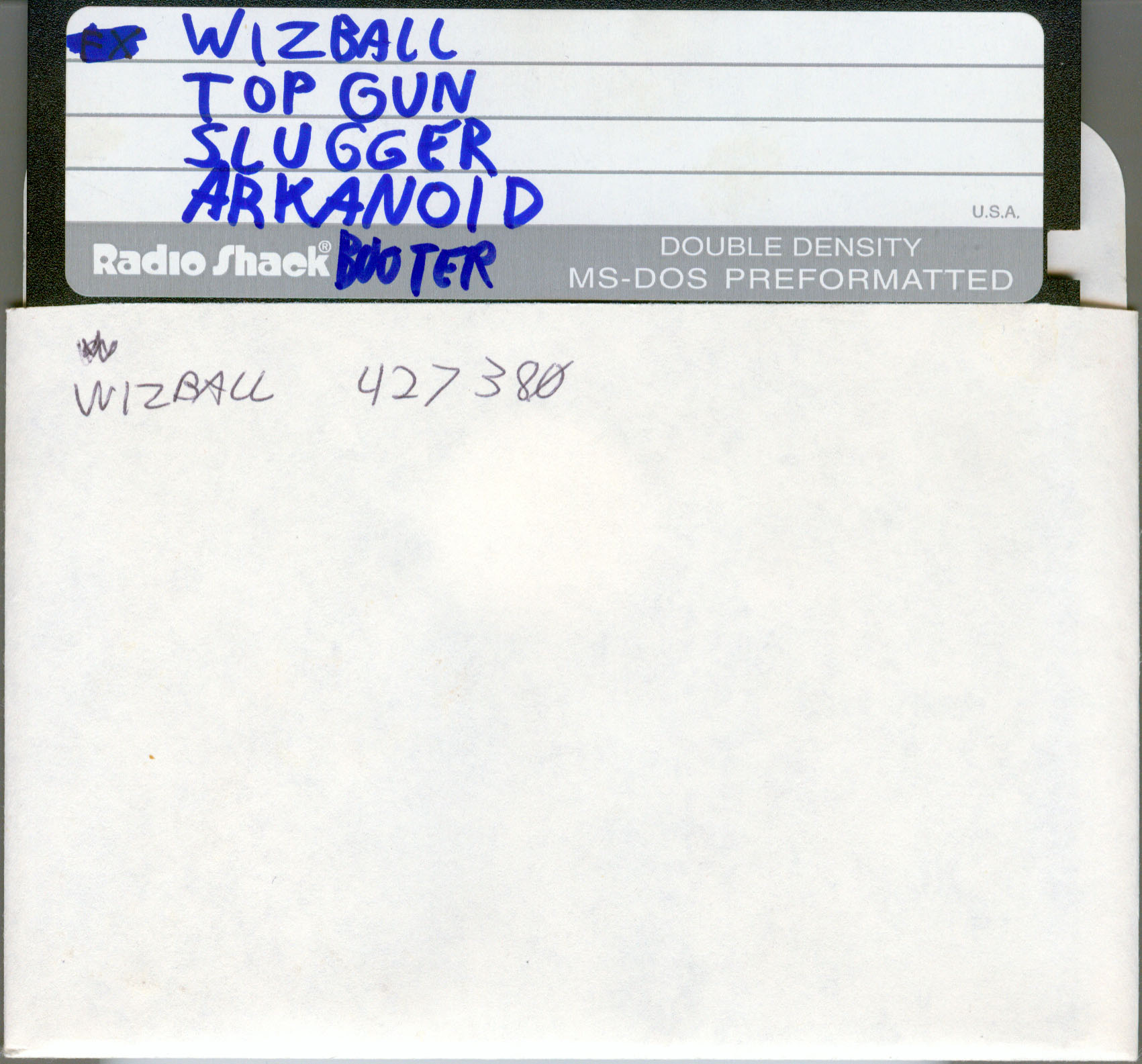
About two years ago, I discovered a bootable disk distribution I hadn’t seen before with four games on it, one of them being Wizball. I wrote it to disk and decided to try it out on my 4.77MHz PC/XT. After trying the others, I started Wizball and before I knew it a few hours had gone by. Determined to finish, I slogged through and managed to complete the game and get a pretty good high score.

Since the game wasn’t written to save high scores to disk, I wrote my score on the sleeve (like putting quarters on the marquee of an arcade game, a common computer nerd practice back in the day). For your enjoyment, here is that disk:

Not a bad score, if I do say so myself. I wrote the score down, happy that I had finally finished the game, and put the disk away.

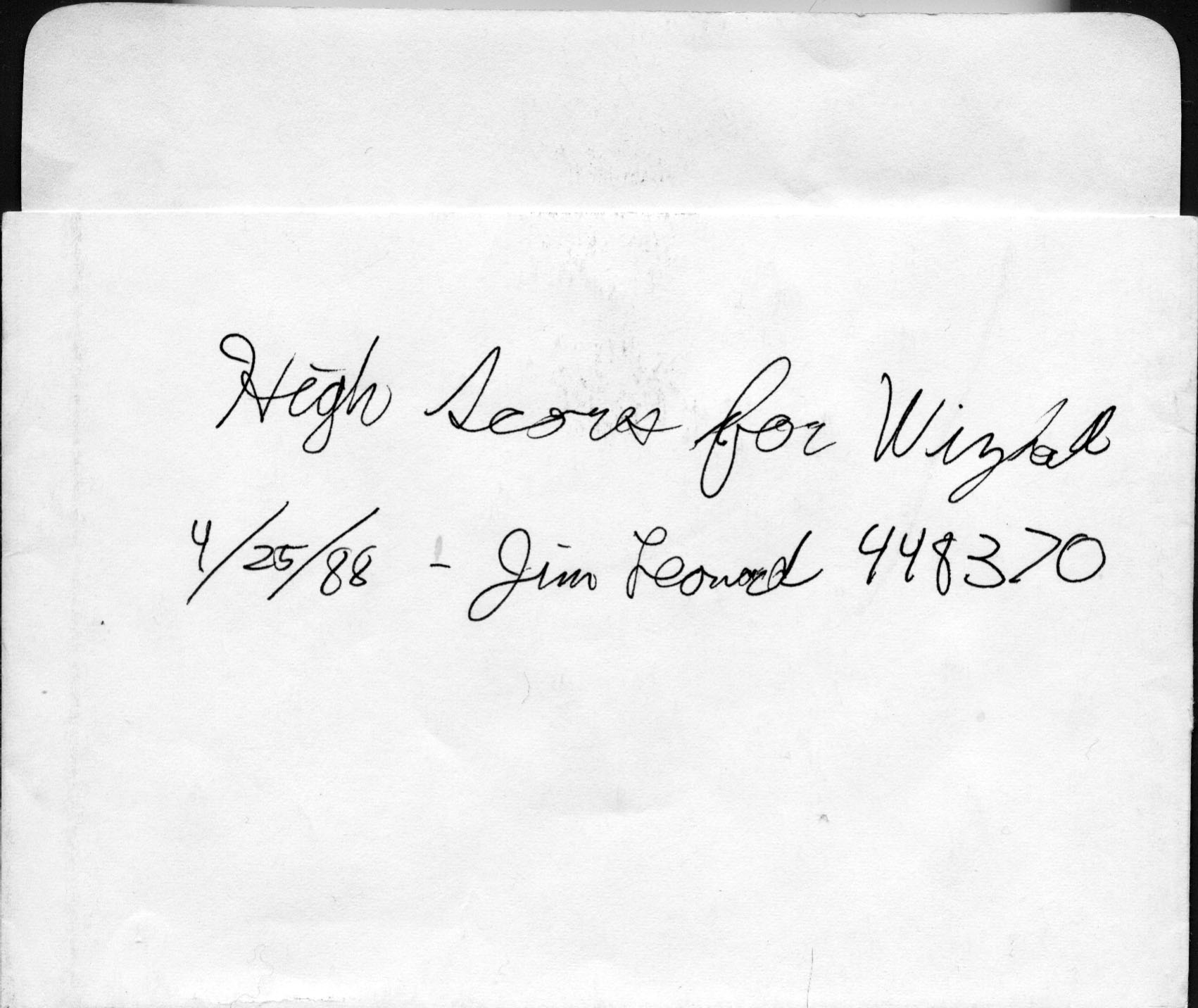
Today I was organizing all of my loose floppy disks and sleeves (gathering into a giant pile is more accurate) in an effort to see which disks I could reformat to archive some data off of a new conquest.  In a pile of nearly 100 sleeves, this little gem put me in my place:

Evidently, twenty years ago, I had kicked my own ass at Wizball.

(And it was a true ass-kicking, since my machine twenty years ago ran at 7.16MHz, not 4.77MHz, which meant the game ran normally and required decent reflexes to play.)

Posted in Gaming, Vintage Computing | 6 Comments »

Crushed under the weight of my own fun

Posted by Trixter on June 11, 2008

I find myself, routinely, in the odd position of having so many fun things to work on that all I can do is sit motionless, trying to pick one. Most of the time I look forward to it; other times I feel confused or overwhelmed, watch TV for four hours, go to bed, then watch more TV in bed.

But still: Most of the time I look forward to it.

So, what is running around in Trixter’s head at any given time? What is the nerd nectar he drinks to keep him going? What electronic dreams keep him awake?

Here is a list of projects that I am working on. Some you already know about, some I have hinted about, and others I haven’t mentioned yet until now. Some have very close completion dates; others I am scheduling to start in 2009 and 2010. No, I’m not going to tell you which ones have which dates! You’ll just have to wait until I announce their start… or completion. (Hint: I’m not even sure when some will start.) And lest you think me a monster, I only work on these after the kids are in bed (and usually after the wife is in bed too).

MONOTONE V1. Most people know about this, but probably haven’t heard much about it since Block Party. I’m still working on finishing up my original milestones for the project, which were PC speaker and IBM PCjr/Tandy 1000 support, a serviceable interface, and an open architecture. Of all my projects, this one really is close to completion (mostly because I want to move on).

MONOTONE V2: Volume control, more device support, more effects, more capable file format. While I’m mostly happy with MONOTONE, the interface was the most irritating to program, especially since I was patently aware of how much wheel reinventing was going on. Since I’ve always wanted to give Turbo Vision a whirl, MONOTONE V2 will probably be converted over to Turbo Vision (if the memory requirements aren’t rediculous).

Halving my collection. I have too much hardware and software, period. I’m holding onto a lot of it needlessly, so I need to pick my priorities and sell/donate at least half of it. Some of the machines will be easy to give up: I have a few 1984-era Macs because I wanted to show my kids what the dawn of personal graphical computing looked like; they’ve seen them, so I don’t need them any more (the Macs, not the children).

Soundcard Museum. The aspect of personal computing that has fascinated me the most during the first decade of my hobby was the multitude of ways you could produce audio with a computer. While I’ve had my share of Apple IIgs and C64 gawking, the history of the IBM PC’s awkward attempts to produce audio holds a special place in my heart because there were so many different ways to do it. Some were flawed (CMS), some odd (msound), some ahead of their time (IBM Music Feature). So, I would like to open up a Soundcard Museum, with history, pictures, audio clips (recorded with a much better card than the one producing the audio, obviously!), programming information, example programs that can really show off what the card(s) can do, etc.

An oldskool PC demo. While there have been tens of thousands of demos released for the C64, Atari ST, Amiga, 386-era DOS, and Windows platforms, I can count the total number of 4.77MHz 8088/CGA demos ever released on one hand. I can count the total number of Tandy 1000 demos on one finger (hi Joe Snow!). There has never been an IBM PCjr demo. That’s where I come in.

Oldskool PC Profiler. I love DOSBox but am frustrated by how it isn’t anywhere close to being cycle-exact, for any CPU that ever supported DOS. I also love my fellow vintage computing community, but am frustrated by how they rely on benchmarks like Landmark CPU Speed and Norton SI to compare machines, which are just plain buggy and inaccurate. I feel it’s time for a utility that can serve two purposes: 1. Accurately determine what hardware a machine is made of (8086? NEC V30? 80386? etc.) and profile CPU, memory, and video adapter to come up with a metric, and 2. Provide a continuous display of how fast DOSBox is running by doing said benchmarks realtime and outputting what machine the reported metric is closest to. By running this utility on your classic machines, you can compare like machines to see how fast they are. By running this utility inside DOSBox, you can “dial” the speed of DOSBox up and down by hitting the emulator keys F11/F12 so you can FINALLY get DOSBox to closely match, a 386sx-16, or 486-33, or 80286-12.

Convert oldskool.org to a real content management system. I built oldskool.org in Zope almost a decade ago. I never quite liked python programming (not because python sucks, but because I suck) so I think it’s time I ditch my nice little code (it automatically builds the navigation tree, puts headers/footers on stuff, etc.) and commit to something like Plone.

Convert all my high-school era cassette tapes to CD. This is more than just every nostalgic adult’s hobby. I hit my darkest time as a human around my junior year of high school, where I was deeply depressed, contemplated suicide on a weekly basis, and attempted it once (which I somehow managed to hide from my parents — hope they don’t read this) I credit three things for keeping me alive during that time: Royally screwing up the dosage, gaming and programming on my AT&T PC 6300, and The Wave. I made many recordings of music I heard on my local Wave affiliate (106.7 here in Chicago until around 1990 when it got switched to Christian talk), and I really want to preserve them. (Plus, they had cute little station IDs, where the time was announced with a little sketch, which I’d like to make available.)

Finish at least one text adventure game. I have started at least 15, but the only one I’ve ever finished was Tass Times in Tonetown, and that was kind of a hybrid, and it took me 11 years (I got stuck from 1986 until 1997 — seriously). So I guess the real goal is Finish at least one Infocom game. Any suggestions?

Convert my rare videotapes to DVD. I have some rare tapes, like some Missing Persons concerts, Urgh! A Music War, The Best of Sex and Violence, and Gadget, that will probably never see release on DVD due to rights wars and lack of interest. I want to give these the full video noise-removal inverse-telecine enhancment treatment.

MindCandy 3. Well, you knew this had to be on the list somewhere. While I dearly love the work our team has done, and I love all of the admiration of fans, I simply don’t have the motivation to think about volume 3 right now. Hint: Cheaper technology will probably raise this motivation.

BLAZE. I have written what I believe to be the very fastest LZSS decompressor for 8086, utilizing all segment and offset registers and using 1-byte opcodes without any segment override prefixes. My decompressor is less complex than LZO and should significantly outperform it on 808x. I just need to write the compressor…  I call this system BLAZE, because I am pretentious to think that I have created the very fastest decompressor and the project should have a similarly pretentious name :-).

8088 Domination.  I have some more animation systems I’d like to pursue.  I have thought of a compression mechanism for the 8088 Corruption video system that guarantees realtime decompression (mainly because REP STOSW is faster than REP MOVSW, and REP nothing is fastest of all of course).  I would also like to adapt the concept of compiled sprites into compiled differential sprites (like Autodesk Animator FLICs but compiled) to see if graphical animation is possible at high speeds.

I think I’ll go watch some TV now.

Posted in Demoscene, Programming, Vintage Computing | 7 Comments »

Even experts make mistakes

Posted by Trixter on June 9, 2008

I’ve been working with classic personal computers for 25+ years. I know all of the precautions in working with older PCs, and yet even I make a mistake so idiotic it just hurts to think about it. I will tell a cautionary tale; see if you can guess the ending before I get there.

At my workplace recently, we were clearing out a 20-yr-old “mini-datacenter” at work (one UPS, one cooling unit, about 50 servers) after a UPS power failure, and one of the machines in the corner was displaying an error message. I hadn’t noticed it before because its screen was usually blanked, but moving over to that side of the room it turned out to be an AT&T PC 6300 WGS. I’m a bit fond of AT&T 63xx machines, so I went over to investigate.

It turns out that the 6300 WGS was originally installed when the datacenter was built in 1987, and its sole purpose was to monitor the UPS. Month after month, the 6300 served as a graphical display of the UPS, with little color-coded pictures of each battery and component, which ones needed service, etc. However, the UPS had failed a few weeks ago (was replaced with power from another source in the building before the servers were affected), so the 6300 had nothing to do now. Some quick research shows that the 6300 WGS model was a much more compatible model; in additional to being able to take a VGA card, it is the fastest 8086 clone I’d ever seen at 10MHz. (I’ve seen faster 8088 clones, but not 8086.) Naturally, I had to have it.

After checking with our company’s obsolete inventory and salvaging procedures, I got the authority to take it home, along with the extremely yellowed VGA monitor, Microsoft bar-of-soap bus mouse, and 9-pin dot-matrix printer. I went over to it and looked at the contents of the hard drive; some directories were boring (Borland Sidekick, PFS:Write), some were moderately interesting stuff (Windows/286, which means the 8086 was replaced with a 10MHz NEC V30 to get it to run), and one very interesting and rare thing (Microsoft Professional Pascal compiler). Rubbing my hands with glee, I ran the program to park the hard drive heads so that the drive wouldn’t get damaged during transport, and powered it off to prepare it for shipping.

Did you see it? Throughout that entire scenario, what did I do wrong? Let’s review some points:

  • “was originally installed when the datacenter was built in 1987”
  • “its sole purpose was to monitor the UPS”
  • “powered it off to prepare it for shipping”

In a nutshell: A desktop computer with a hard drive was installed in 1987 and powered up. All it did was review data coming from a UPS. The desktop computer itself was plugged into the UPS, ergo it had never been powered down. It had been running continuously for over 20 years.

Which means the hard drive had been spinning continuously for 20 years. And I powered it off.

Checking the machine today, to do one last check on it before it was moved, the hard drive first returned garbage, then on a second boot refused to spin up. Which, after a moment of confusion, didn’t surprise me. Oh well; maybe a miracle will occur and I’ll have a second chance of getting data off of the drive, but I doubt it.

My friends, if you want to keep a hard drive running for 20 years, keep it spinning.

Posted in Vintage Computing | 6 Comments »

Collecting and Programming

Posted by Trixter on May 25, 2008

Just a quick note that Slashdot posted a main-page post about software collecting, one of my oldest hobbies.  I personally weighed in, of course.

For those not following MONOTONE, I released another alpha yesterday with Adlib support and more effects.  Still not finished, but it’s starting to become usable and interesting now :)

Posted in Programming, Software Piracy, Vintage Computing | 3 Comments »

Punish Floppy Disks For Fun And Profit

Posted by Trixter on May 11, 2008

The question of which DOS-era floppy backup program was “best” has always bothered me over the years, so today I spent the better part of an afternoon satisfying my curiosity. (By “floppy backup program”, I mean programs that intelligently used high-speed DMA to format and write backup data while the computer was doing other things in the background, like reading from the hard disk and compressing the data.)

Results are here, for the curious:

http://www.oldskool.org/guides/dosbackupshootout

If I missed an obvious one that runs on XT-class hardware, let me know.

Posted in Vintage Computing | 6 Comments »

Beefing up your AT&T PC 6300

Posted by Trixter on April 22, 2008

No, this is not an extremely well-researched elaborate April Fool’s joke; I’m actually serious this time. In this post, I’m going to illustrate ways you can beef up your AT&T PC 6300, just stopping short of throwing it in the garbage and replacing it with an XT clone.

The AT&T PC 6300 was AT&T’s attempt to get into the personal computer market in 1984. AT&T bought the rights to sell the Olivetti M24 in the USA and made it available as the “PC 6300” in late 1984. It exceeded the IBM PC in just about every way:

  • It used an 8MHz 8086, about 2.2x the speed of the IBM PC’s 4.77MHz 8088
  • An extended graphics mode went as high as 640×400 (which also resulted in sharper text in normal text modes)
  • It had special expansion slots that could be used to turn it into the 6300+, which would run AT&T UNIX, or install expanded memory boards (usually required to run AT&T UNIX :-) although the memory could be used as EMS under DOS)
  • It had a few aesthetic improvements: it was smaller and lighter than the IBM PC, and the floppy drives were whisper-quiet
  • It contained a battery-backed internal clock chip that would remember the time and date even if powered off
  • Like Sun machines, the keyboard had a special mouse port on it, so you could buy a 6300 mouse and attach it to the keyboard. Not only did this save desktop area from cable mess, but the “keyboard mouse” had a wicked cool property: If you had no mouse driver loaded, moving the mouse would automatically press up/down/left/right arrow keys for you! You could use the mouse to navigate any program, regardless of whether or not it supported a mouse.

The problem with the 6300 is that those enhancements required many proprietary changes to the unit; they also didn’t predict how long the computer would be useful into the 1990s. These two factors led to some nasty surprises the longer you owned one:

  • The enhanced video required special monitors, and could not easily be replaced with an EGA or VGA card without extreme hardware preperation. Repairing the special monitors was also quite costly; I remember a $300 charge to repair a blown flyback transformer on mine. That repair took two very long months…
  • To support the mouse attachment, the keyboard had a non-standard 9-pin DIN, so you could only hook up AT&T keyboards to it. (Thankfully, there is a schematic on the web you can use to build an adapter to hook up PC/XT keyboards to it.)
  • The motherboard, in an attempt to save space, has slots on the top side but the components and headers on the bottom side. This was a major pain in the ass if you had to reroute cables through the machine (as I had to do when installing a Central Point Option Board).
  • To properly support the 6300 100%, you were strongly encouraged to use AT&T MS-DOS. Other DOS variants, including IBM’s true blue PC-DOS, wouldn’t support the built-in clock chip and other 6300 features.
  • Tweaking CGA, at Seven Spirits of Ra extremes, did not look right with the higher-resolution text mode.
  • The aforementioned clock chip was worse than not being Y2K-compliant — it wasn’t even Y1992 compliant! AT&T used only 3 bits for the year, starting at 1984, which limits the machine to the years 1984-1991. Trying to set the date to anything past January 1st 1992 has the year locked at 1991.

While the above prompted most owners to punt them past 1992, the PC 6300 remains a very interesting compatible in every sense of the word. I still own mine 23 years later, and for those who would like to restore theirs to prime game-playing condition, I am happy to share my secrets on how to “mod” your AT&T PC 6300:

  • Replace the 8086 CPU with an NEC V30. This will boost the machine to 2.1x the speed of an IBM PC.
  • Try to find the 1.43 BIOS chip upgrade if your machine doesn’t already have it (you can see what BIOS revision you have when booting the machine). The enhanced BIOS chips (there were two in the upgrade package) obviously improved program compatibility, although the major players such as Flight Simulator and Lotus 1-2-3 already ran fine. They’re also required if you want to run Microsoft Word for DOS in high-res WYSIWYG mode (see below), but be careful when you install them: They’re not notched, and putting them in backwards will release the magic smoke in about 3 seconds. Please don’t ask me how I know this.
  • Run programs that support the 6300’s special 640×400 graphics mode so you can feel good about maintaining a proprietary clone and monitor. For example, lots of graphical viewers like CSHOW will display B&W gifs at that resolution (and before GIF we had MacPaint images, and the 6300 had a 640×400 MacPaint viewer). There were also some games that could use 640×400, like The Colony. Also, FRACTINT (fast fractal exploration program) will use the special graphics mode. As previously mentioned, Microsoft Word for DOS 4.0 and later will use 640×400 for on-screen WYSIWYG (ie. you italicize a word and it actually shows up italicized. Look, we had it really rough in the 1980s, ok? Please stop laughing!)
  • If you don’t care about 5.25″ floppy compatibility and have a hard drive, flip the DIP switches on the motherboard to enable 96 TPI mode for the floppy drives. You won’t be able to read 5.25″ regular DSDD 40-track disks any more, but you will be able to format 5.25″ disks to 720K (the drives pack 80 tracks onto a disk in that mode). This is really for personal yucks only, as you will only be able to read such disks on a 1.2MB drive.
  • The speaker in the 6300 sucks; make a cable with alligator clips you can use to clip onto the speaker leads and run it to a set of speakers or a stereo.
  • Install an 8087 math coprocessor and run some of the more crazy fractals on FRACTINT (see above) without waiting overnight.
  • If you’re handy with a dremel and have the hard drive model (one floppy drive and one hard drive), cut a vertical 3.5″ drive bay into the front of the case, about one inch to the left of the drives. You can then add a second drive, a 720K 3.5″.
  • Install a hardcard for a 2nd hard drive (or first, if you don’t have one). I used a Plus HardCard 40 myself.
  • Install a Sound Blaster for some audio fun. For maximum enjoyment, use an original Sound Blaster 1.0 at IRQ 2 or 3, so you can get early programs with buggy SB support playing digitized sound, like Rise of the Dragon, Stellar 7, or Tongue of the Fatman.  (Rise of the Dragon has particularly nice opening digitized audio.)
  • If you can find one, try to obtain an AT&T PC 6300 memory board (with software .sys driver!) so you can have 2MB of EMS in the machine. It helps with Lotus 1-2-3, but it really helps as a giant disk cache.
  • For that matter, try to find the 6300 mouse. Moving the cursor around with a mouse in text apps that don’t support mice is a trip.

All of the above modifications will enhance your enjoyment of the 6300 while still keeping it distinctly 6300-ish. Some are difficult (dremel’ing a drive bay), but the effort is worth it.

Or, you can buy my 6300 off of me. For one meelyion dohlaars.

PS:  Original color or mono monitor broken?  The video output is analog, not digital, so you can wire up a VGA converter cable and use a VGA monitor.

Posted in Vintage Computing | 42 Comments »